
Speak to a Certified Mechanic Today
Get expert advice on diagnostic codes, car issues, and repairs. Book a call now and solve your vehicle problems with confidence.
Are you stuck trying to understand a diagnostic code or dealing with mysterious car issues? Don’t waste time guessing or taking unnecessary trips to the shop. Book a consultation with our certified mechanics to get answers and clear guidance on your car questions.
How Our Mechanic Consultation Works
Step 1: First, sign up for a Pro Membership, then go to your Dashboard
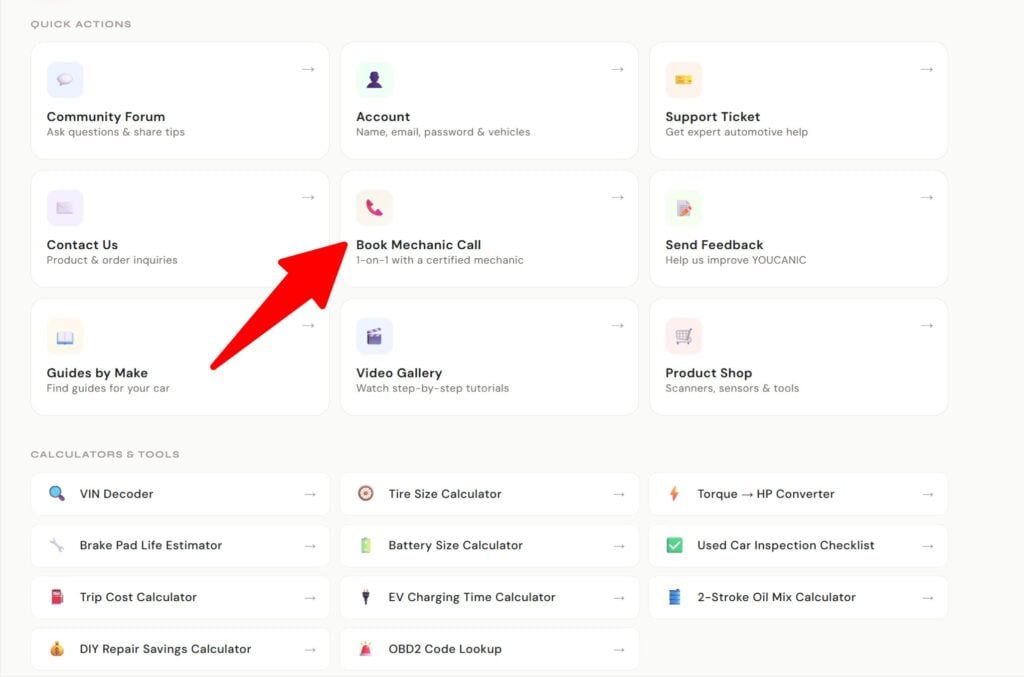
Dashboard for logged-in users. Book a call is only available for Pro members.
Step 2: Pick a Date
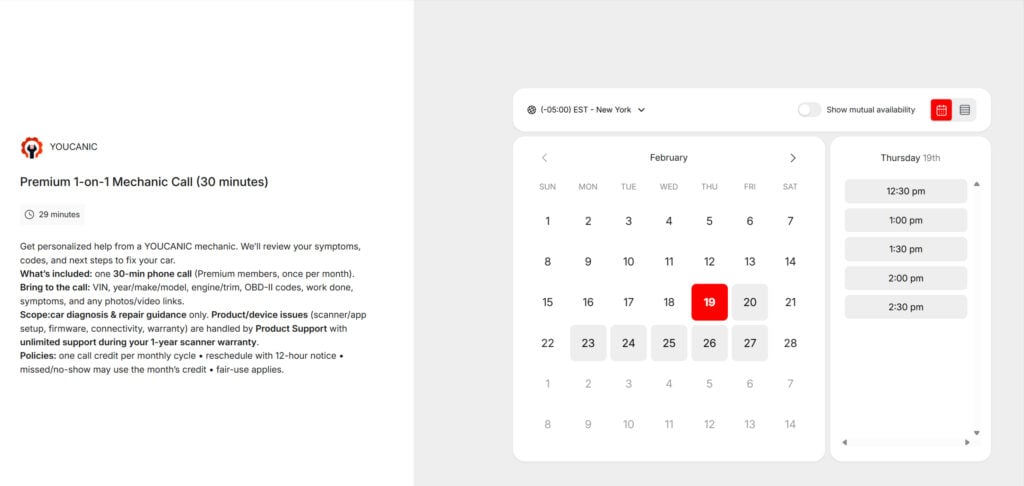
You will be able to see our calendar and schedule a call. Send us any diagnostic codes, warning lights, or specific issues in advance so our mechanic can prepare for your call.
Step 3: Talk to a Mechanic
On the call, get personalized advice about your car’s problems, from fault codes to maintenance and repair options.
Comprehensive Mechanic Support – We Cover All Your Car Concerns
- Diagnostic Codes: Get clear explanations for check engine light codes, ABS, transmission issues, and more.
- Common Vehicle Problems: Help with engine misfires, rough idling, overheating, strange noises, and other common concerns.
- Maintenance Guidance: Receive expert advice on routine services like oil changes, brake inspections, tire rotations, and more.
- Repair Advice: Honest feedback on whether repairs are urgent or if they can wait, helping you save on unnecessary costs.
- Pre-Purchase Consultations: Do you have questions about a car you’re considering buying? We can help you evaluate its condition, discuss any potential issues, and review diagnostic reports.
- Diagnostic Reports: Review and understand your vehicle’s diagnostic reports, ensuring you make informed decisions.
- Performance Issues: Troubleshooting power loss, poor fuel economy, or other performance-related problems.
FAQ
How long is the call?
Calls are typically between 10 to 30 minutes for Premium members only. If the issue is not resolved, we can follow up via email.
What if I need more time for the consultation?
If you feel that additional time is necessary, you can follow up with an email or wait until next month. We are committed to ensuring you get all the support you need, and we’ll make the process as smooth as possible.
How will the mechanic contact me?
Our mechanic will call you at the phone number you provide during the booking process. Please make sure your contact details are correct so that we can reach you at your scheduled time.
Can the mechanic help me remotely during the call?
Yes! If you have the YOUCANIC Full System Scanner, our mechanic can remotely control the device and assist you directly. Even if you have a different scan tool, we can still support you by walking you through its features and helping you interpret the data.
Do you support other diagnostic tools besides the YOUCANIC scanner?
Yes! Even if you have a different scan tool, our mechanics can help you read and interpret the data. We’re here to guide you through troubleshooting, regardless of the tool you use.
What kinds of issues can I ask about?
You can ask about a wide range of common car problems, including:
Diagnostic Codes: We’ll help you understand check engine light codes, ABS, transmission issues, and more.
Pre-Purchase Advice: If you’re considering buying a car, we can guide you on what to check and help you review the vehicle’s condition before making a decision.
General Car Issues: Whether it’s a misfire, rough idling, overheating, or any other car issue, we’ve got you covered.
Maintenance Advice: Get recommendations for routine services like oil changes, brake inspections, and tire rotations.
Repair Advice: We provide honest feedback about whether a repair is necessary or if it can be delayed.
Do I need to provide diagnostic codes before the call?
It’s helpful but not mandatory. If you already have diagnostic codes from an OBD-II scanner, it will allow the mechanic to provide more precise guidance during your call.
Can I schedule a consultation for more than one vehicle?
Yes, if you need help with multiple vehicles, you can let us know in advance so we can tailor the consultation to cover all your questions. Follow-up email support are also available for ongoing support.
Is the consultation confidential?
Absolutely. We value your privacy, and all information shared during the consultation is confidential. Your vehicle details and personal information are never shared with third parties.