
Skip to content
YOUCANIC
  • LEARNExpand
    • Find by Vehicle
    • Video Library
    • Scanner Resources
    • Mechanic Fixes
    • Success Stories
    • Community Forum
    • Glossary
    • Advanced Vehicle Data by VIN
    • Share a Fix ✦
  • PRODUCTSExpand
    • UCAN-II PRO
    • UCAN-HD-A
    • Oscilloscope
    • High Capacity Jump Starter RB6000A
    • Battery & Charging System Tester
    • Adapters
    • All Products
    • Rent a Scanner
    • UCAN-II Product History
  • TOOLSExpand
    • AI Assistance
    • Calculators
    • VIN Decoder Basic – Free
    • VIN Decoder – Advanced
    • Recall Check
    • DTC Code Library
    • Parts Lookup
    • Owner’s Manual
    • Maintenance Schedule
    • Vehicle Market Value
  • SUPPORTExpand
    • FAQs
    • Contact Us
    • Coverage Check
    • Track Order
    • Product Resources
    • Ask On Our Podcast
  • ABOUTExpand
    • About Us
    • Contact Us
    • Press
    • Right to Repair: Every Car Owner’s Right
Log in Create account
🛒Shop
YOUCANIC

BMW AC Troubleshoot Blowing Warm | Check Codes, AC Compressor & Temperature Sensors YOUCANIC Scanner
Home / BMW AC Troubleshoot Blowing Warm | Check Codes, AC Compressor & Temperature Sensors YOUCANIC Scanner
Youtube video
⏱ 4:04 📅 Jul 11, 2024 ▶ Watch on YouTube

About this video

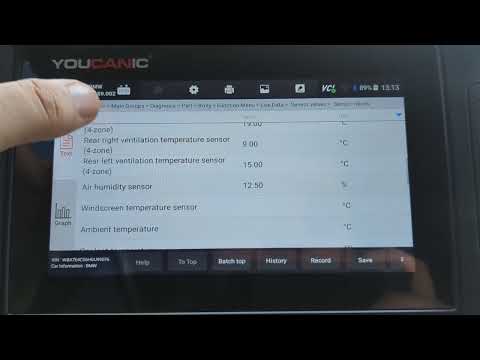
In this video, we demonstrate how to troubleshoot an AC system that is blowing warm air on a 2017 BMW 740 7-Series using the YOUCANIC Full System Scanner. Properly diagnosing issues with the AC compressor, temperature sensors, and other components is crucial for restoring optimal cooling performance.

Why is it needed?
A malfunctioning AC system can result in discomfort, especially during hot weather. Issues with the AC compressor, refrigerant levels, or temperature sensors can prevent the system from cooling effectively. Troubleshooting and identifying the root cause of the problem ensures efficient repairs and restores the vehicle’s comfort.

Common messages and fault codes related to AC issues:

“AC Compressor Malfunction”: Message indicating a problem with the AC compressor.
DTC 9C54: AC compressor clutch control circuit malfunction.
DTC 9C55: AC refrigerant pressure too high/low.
DTC 9C56: Evaporator temperature sensor error.
DTC 9C57: Interior temperature sensor malfunction.
Technical Terms and Process:

AC Compressor: The component that compresses and circulates the refrigerant in the AC system.
Temperature Sensors: Sensors that monitor the temperature of the air inside the cabin and the AC system components.
Refrigerant: The fluid that absorbs and releases heat to cool the air in the AC system.
Evaporator: The component where the refrigerant absorbs heat from the cabin air.
Diagnostic Trouble Codes (DTCs): Codes that indicate specific faults within the vehicle’s systems.
Troubleshooting Steps:

Check Refrigerant Levels: Ensure the AC system has the correct amount of refrigerant. Low refrigerant levels can cause the AC to blow warm air.
Inspect Electrical Connections: Check the wiring and connectors for the AC compressor and temperature sensors for any loose or damaged connections.
Perform Active Tests: Use the YOUCANIC Scanner to perform active tests on the AC compressor and temperature sensors, verifying their operation.
Read & Clear DTCs: Use the scanner to read any diagnostic trouble codes related to the AC system and clear them after resolving the issues.
Inspect Temperature Sensors: Check the temperature sensors for proper operation and accuracy.
Using the YOUCANIC Full System Scanner, we provide a detailed, step-by-step guide for troubleshooting an AC system that is blowing warm air on your BMW 740 7-Series. This tutorial is ideal for both DIY car enthusiasts and professional mechanics, ensuring your vehicle’s AC system operates smoothly and efficiently. Learn how to diagnose and fix AC issues with our comprehensive guide.

YOUCANIC Home

606 Baltimore Ave Suite 405
Towson, MD 21204 USA
Tel: 1 (888) 959-4265
Hours: M-F 9:00 AM - 4:00 PM

© 2015-2026 YOUCANIC®, owned by Bohotina LLC. All rights reserved. YOUCANIC® delivers expert automotive guides and DIY solutions empowering vehicle owners to diagnose and fix car problems with confidence. While we strive for technical accuracy, our content is for educational purposes and cannot substitute for professional mechanical advice. Use of this site constitutes acceptance of our Privacy Policy andTerms of Service. Need help? Contact our dedicated Customer Service team.

YouTube Facebook Email Google Reviews Phone
  • About Us
  • Contact Us
  • DMCA
  • Privacy Policy
  • Terms and Conditions

Searching...

Scroll to top
🛒 SHOP
  • LEARN
    • Find by Vehicle
    • Video Library
    • Scanner Resources
    • Mechanic Fixes
    • Success Stories
    • Community Forum
    • Glossary
    • Advanced Vehicle Data by VIN
    • Share a Fix ✦
  • PRODUCTS
    • UCAN-II PRO
    • UCAN-HD-A
    • Oscilloscope
    • High Capacity Jump Starter RB6000A
    • Battery & Charging System Tester
    • Adapters
    • All Products
    • Rent a Scanner
    • UCAN-II Product History
  • TOOLS
    • AI Assistance
    • Calculators
    • VIN Decoder Basic – Free
    • VIN Decoder – Advanced
    • Recall Check
    • DTC Code Library
    • Parts Lookup
    • Owner’s Manual
    • Maintenance Schedule
    • Vehicle Market Value
  • SUPPORT
    • FAQs
    • Contact Us
    • Coverage Check
    • Track Order
    • Product Resources
    • Ask On Our Podcast
  • ABOUT
    • About Us
    • Contact Us
    • Press
    • Right to Repair: Every Car Owner’s Right

Log in Create account

Search