
How and Where to Add Brake Fluid on 2007-2013 Chevy Silverado & GMC Sierra (GMT900 Chassis)
About this video
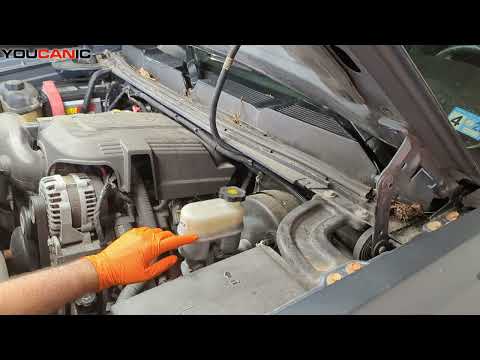
In this essential tutorial, you will learn how and where to add brake fluid to a 2008 Chevrolet Silverado 1500. This guide is applicable to all 2007-2013 Chevrolet Silverado and GMC Sierra models built on the GMT900 platform. Maintaining proper brake fluid levels is crucial for ensuring safe braking performance and preventing brake system issues.
Key Steps:
Locate the Brake Fluid Reservoir: The brake fluid reservoir is typically found near the back of the engine bay, mounted on the driver’s side, and often labeled with a brake symbol.
Check Fluid Level: The reservoir will have markings indicating the “Low” and “Full” levels. Ensure the vehicle is parked on a level surface when checking the fluid level.
Add Brake Fluid If Necessary: If the fluid level is below the “Low” mark, add the appropriate type of brake fluid (usually DOT 3 or DOT 4, depending on your model) until it reaches the “Full” mark. Be careful not to spill any fluid, as it can damage painted surfaces.
Common Symptoms of Low Brake Fluid Levels:
Warning light on the dashboard indicating low brake fluid.
Spongy or soft brake pedal when pressed.
Reduced braking effectiveness or longer stopping distances.
Fluid leaks under the vehicle near the brake components.
For more helpful tips and maintenance guides, visit YOUCANIC.com, your ultimate resource for automotive care and solutions.