
Skip to content
YOUCANIC
  • PRODUCTSExpand
    • UCAN-II PRO
    • UCAN-HD-A
    • Oscilloscope
    • High Capacity Jump Starter RB6000A
    • Battery & Charging System Tester
    • Adapters
    • All Products
    • Rent a Scanner
  • LEARNExpand
    • Find by Vehicle
    • Video Library
    • Scanner Resources
    • Mechanic Fixes
    • Success Stories
    • Community Forum
    • Glossary
    • Advanced Vehicle Data by VIN
    • Share a Fix ✦
  • TOOLSExpand
    • VIN Decoder Basic – Free
    • VIN Decoder – Advanced
    • Recall Check
    • DTC Code Library
    • Parts Lookup
    • DIY Repair Savings Calculator
    • Owner’s Manual
    • Maintenance Schedule Lookup
    • Battery Group Finder
    • Used Car Inspection Checklist
    • Vehicle Market Value
  • SUPPORTExpand
    • FAQs
    • Product Support
    • Coverage Check
    • Track Order
    • Product Resources
    • Talk to a Mechanic
  • ABOUTExpand
    • About Us
    • Contact Us
    • Press
    • Right to Repair: Every Car Owner’s Right
Log in Create account
🛒Shop
YOUCANIC

How to Perform Transmission Adaptation on Mercedes-Benz with YOUCANIC Scanner
Home / How to Perform Transmission Adaptation on Mercedes-Benz with YOUCANIC Scanner
Youtube video
⏱ 5:48 📅 Jan 16, 2025 ▶ Watch on YouTube

About this video

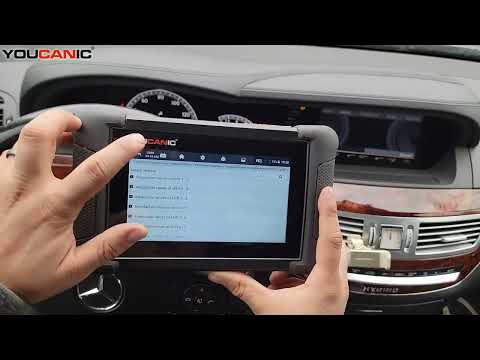
Learn how to use the YOUCANIC scanner to perform a transmission adaptation reset on your Mercedes-Benz. This process recalibrates the transmission control module (TCM) to improve shifting performance and resolve common transmission issues, such as rough or delayed gear changes.

This guide is applicable to Mercedes-Benz vehicles equipped with automatic transmissions, including:

C-Class (W204, W205)
E-Class (W212, W213)
S-Class (W221, W222)
GLC, GLE, GLS SUVs
ML and GL-Class (W164, X166)

Topics Covered in This Video:

Connecting the YOUCANIC scanner to your Mercedes-Benz OBD-II port.
Accessing the Transmission Control Module (TCM) for adaptation.
Step-by-step instructions for resetting the transmission adaptation values.
When and why you should perform a transmission adaptation reset.
Verifying the adaptation process and testing the vehicle after completion.

Common Searches Addressed in This Video:

“How to reset Mercedes transmission adaptation with scanner”
“YOUCANIC scanner transmission adaptation tutorial”
“Fixing rough gear shifts on Mercedes-Benz”
“Transmission adaptation reset procedure for C-Class or E-Class”

Why Perform a Transmission Adaptation Reset?

Recalibrates the transmission to match your driving habits or after component replacements (e.g., valve body, solenoids, or fluid changes).
Resolves shifting issues, such as rough or delayed gear changes.
Ensures smooth and consistent transmission performance.

Common Symptoms Indicating the Need for Transmission Adaptation Reset:

Harsh or delayed gear shifts.
Inconsistent shifting behavior.
Transmission not responding correctly to throttle inputs.

Performing a transmission adaptation reset with the YOUCANIC scanner is a simple way to restore your Mercedes-Benz’s transmission to peak performance. Follow this guide for a quick and effective process.

👍 Like, comment, and subscribe for more Mercedes diagnostics tutorials, maintenance tips, and troubleshooting guides!

#MercedesBenz #TransmissionAdaptation #YOUCANICScanner #CarDiagnostics

YOUCANIC Home

606 Baltimore Ave Suite 405
Towson, MD 21204 USA
Tel: 1 (888) 959-4265
Hours: M-F 9:00 AM - 4:00 PM

© 2015-2026 YOUCANIC®, owned by Bohotina LLC. All rights reserved. YOUCANIC® delivers expert automotive guides and DIY solutions empowering vehicle owners to diagnose and fix car problems with confidence. While we strive for technical accuracy, our content is for educational purposes and cannot substitute for professional mechanical advice. Use of this site constitutes acceptance of our Privacy Policy andTerms of Service. Need help? Contact our dedicated Customer Service team.

YouTube Facebook Email Google Reviews Phone
  • About Us
  • Contact Us
  • DMCA
  • Privacy Policy
  • Terms and Conditions

Searching...

Scroll to top
🛒 SHOP
  • PRODUCTS
    • UCAN-II PRO
    • UCAN-HD-A
    • Oscilloscope
    • High Capacity Jump Starter RB6000A
    • Battery & Charging System Tester
    • Adapters
    • All Products
    • Rent a Scanner
  • LEARN
    • Find by Vehicle
    • Video Library
    • Scanner Resources
    • Mechanic Fixes
    • Success Stories
    • Community Forum
    • Glossary
    • Advanced Vehicle Data by VIN
    • Share a Fix ✦
  • TOOLS
    • VIN Decoder Basic – Free
    • VIN Decoder – Advanced
    • Recall Check
    • DTC Code Library
    • Parts Lookup
    • DIY Repair Savings Calculator
    • Owner’s Manual
    • Maintenance Schedule Lookup
    • Battery Group Finder
    • Used Car Inspection Checklist
    • Vehicle Market Value
  • SUPPORT
    • FAQs
    • Product Support
    • Coverage Check
    • Track Order
    • Product Resources
    • Talk to a Mechanic
  • ABOUT
    • About Us
    • Contact Us
    • Press
    • Right to Repair: Every Car Owner’s Right

Log in Create account

Search