
Skip to content
YOUCANIC
  • LEARNExpand
    • Find by Vehicle
    • Video Library
    • Scanner Resources
    • Mechanic Fixes
    • Success Stories
    • Community Forum
    • Glossary
    • Advanced Vehicle Data by VIN
    • Share a Fix ✦
  • PRODUCTSExpand
    • UCAN-II PRO
    • UCAN-HD-A
    • Oscilloscope
    • High Capacity Jump Starter RB6000A
    • Battery & Charging System Tester
    • Adapters
    • All Products
    • Rent a Scanner
    • UCAN-II Product History
  • TOOLSExpand
    • AI Assistance
    • Calculators
    • VIN Decoder Basic – Free
    • VIN Decoder – Advanced
    • Recall Check
    • DTC Code Library
    • Parts Lookup
    • Owner’s Manual
    • Maintenance Schedule
    • Vehicle Market Value
  • SUPPORTExpand
    • FAQs
    • Contact Us
    • Coverage Check
    • Track Order
    • Product Resources
    • Ask On Our Podcast
  • ABOUTExpand
    • About Us
    • Contact Us
    • Press
    • Right to Repair: Every Car Owner’s Right
Log in Create account
🛒Shop
YOUCANIC

How to Test a Car Battery Correctly
Home / How to Test a Car Battery Correctly
Youtube video
⏱ 3:39 📅 Jun 7, 2024 ▶ Watch on YouTube

About this video

Read article: https://www.youcanic.com/how-to-test-car-battery-correctly-step-by-step-guide/

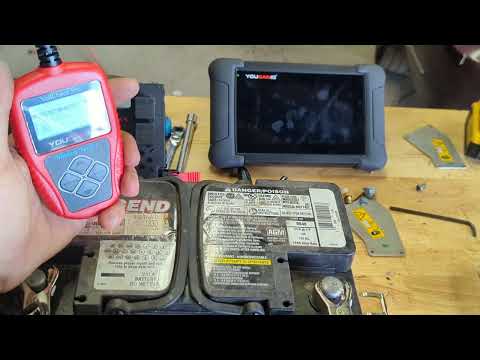
Testing a car battery with the YOUCANIC Battery Tester is straightforward. Here’s a step-by-step guide to help you perform the test correctly:

Tools Needed:
YOUCANIC Battery Tester
Safety gloves and goggles
Steps:
Safety First: Ensure the car is turned off, the keys are out of the ignition, and you’re wearing safety gear.

Locate the Battery: Find the car battery, usually located under the hood. In some vehicles, it might be in the trunk or under a seat.

Clean the Terminals: If the battery terminals are corroded, clean them with a brush and a mixture of baking soda and water. Ensure the terminals are dry before testing.

Prepare the YOUCANIC Battery Tester:

Turn on the YOUCANIC Battery Tester.
Follow the on-screen instructions to select the appropriate battery type (e.g., lead-acid, AGM, gel).
Connect the Tester:

Attach the red clamp to the battery’s positive terminal.
Attach the black clamp to the battery’s negative terminal.
Perform the Test:

Once connected, the tester will automatically begin reading the battery’s voltage and health.
Follow the prompts on the screen. The tester might ask you to enter additional information, such as the battery’s CCA (Cold Cranking Amps) rating.
Read the Results:

The tester will display the battery’s state of health (SOH), state of charge (SOC), and voltage.
Typical results:
SOH (State of Health): Indicates the battery’s overall condition (percentage).
SOC (State of Charge): Shows how charged the battery is (percentage).
Voltage: The voltage reading of the battery.
Understanding the Results:
State of Health (SOH):

80% or higher: Good condition.
50-79%: Battery is aging but still functional.
Below 50%: Battery is in poor condition and may need replacement.
State of Charge (SOC):

75% or higher: Battery is well-charged.
50-74%: Battery has a moderate charge.
Below 50%: Battery needs recharging.
Voltage:

12.6 volts or higher: Fully charged.
12.4-12.6 volts: Partially charged.
Below 12.4 volts: Needs recharging.
By following these steps with the YOUCANIC Battery Tester, you can accurately assess the condition and charge of your car battery.

YOUCANIC Home

606 Baltimore Ave Suite 405
Towson, MD 21204 USA
Tel: 1 (888) 959-4265
Hours: M-F 9:00 AM - 4:00 PM

© 2015-2026 YOUCANIC®, owned by Bohotina LLC. All rights reserved. YOUCANIC® delivers expert automotive guides and DIY solutions empowering vehicle owners to diagnose and fix car problems with confidence. While we strive for technical accuracy, our content is for educational purposes and cannot substitute for professional mechanical advice. Use of this site constitutes acceptance of our Privacy Policy andTerms of Service. Need help? Contact our dedicated Customer Service team.

YouTube Facebook Email Google Reviews Phone
  • About Us
  • Contact Us
  • DMCA
  • Privacy Policy
  • Terms and Conditions

Searching...

Scroll to top
🛒 SHOP
  • LEARN
    • Find by Vehicle
    • Video Library
    • Scanner Resources
    • Mechanic Fixes
    • Success Stories
    • Community Forum
    • Glossary
    • Advanced Vehicle Data by VIN
    • Share a Fix ✦
  • PRODUCTS
    • UCAN-II PRO
    • UCAN-HD-A
    • Oscilloscope
    • High Capacity Jump Starter RB6000A
    • Battery & Charging System Tester
    • Adapters
    • All Products
    • Rent a Scanner
    • UCAN-II Product History
  • TOOLS
    • AI Assistance
    • Calculators
    • VIN Decoder Basic – Free
    • VIN Decoder – Advanced
    • Recall Check
    • DTC Code Library
    • Parts Lookup
    • Owner’s Manual
    • Maintenance Schedule
    • Vehicle Market Value
  • SUPPORT
    • FAQs
    • Contact Us
    • Coverage Check
    • Track Order
    • Product Resources
    • Ask On Our Podcast
  • ABOUT
    • About Us
    • Contact Us
    • Press
    • Right to Repair: Every Car Owner’s Right

Log in Create account

Search