
Skip to content
YOUCANIC
  • PRODUCTSExpand
    • UCAN-II PRO
    • UCAN-HD-A
    • Oscilloscope
    • High Capacity Jump Starter RB6000A
    • Battery & Charging System Tester
    • Adapters
    • All Products
    • Rent a Scanner
  • LEARNExpand
    • Find by Vehicle
    • Video Library
    • Scanner Resources
    • Mechanic Fixes
    • Success Stories
    • Community Forum
    • Glossary
    • Advanced Vehicle Data by VIN
    • Share a Fix ✦
  • TOOLSExpand
    • Calculators
    • VIN Decoder Basic – Free
    • VIN Decoder – Advanced
    • Recall Check
    • DTC Code Library
    • Parts Lookup
    • DIY Repair Savings Calculator
    • Owner’s Manual
    • Maintenance Schedule Lookup
    • Used Car Inspection Checklist
    • Vehicle Market Value
  • SUPPORTExpand
    • FAQs
    • Product Support
    • Coverage Check
    • Track Order
    • Product Resources
    • Talk to a Mechanic
  • ABOUTExpand
    • About Us
    • Contact Us
    • Press
    • Right to Repair: Every Car Owner’s Right
Log in Create account
🛒Shop
YOUCANIC

How to improve the battery life on YOUCANIC scanner?

← Back to All Questions
Home › Questions & Answers › How to improve the battery life on YOUCANIC scanner?

Turn on battery saver by selecting the app on the second page of the home screen or by going to settings, selecting system settings, then tapping the battery option.
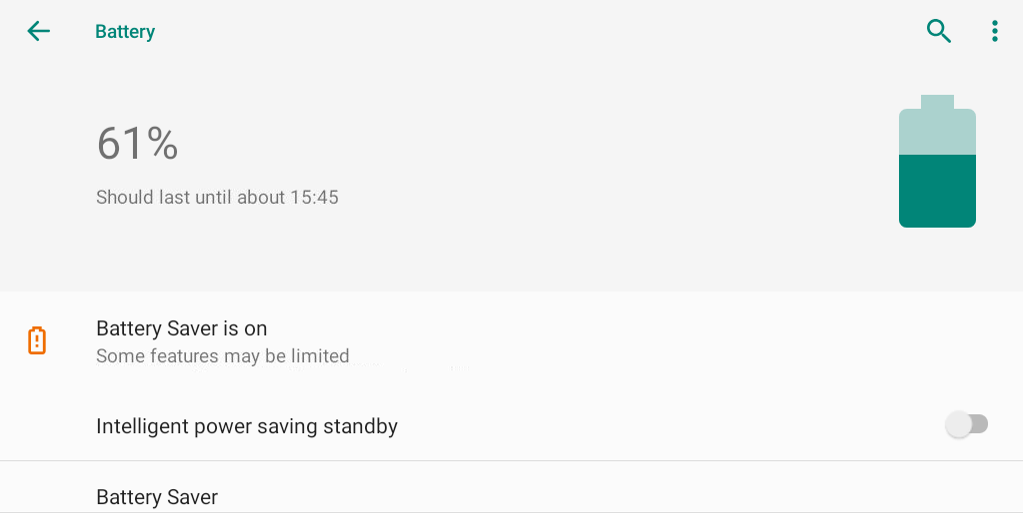
Battery Saver - How To Improve The Battery Life On Youcanic Scanner?

To improve and extend the battery life of your YOUCANIC scanner, it is important to follow proper charging and usage habits. Always use a standard 5V USB charger (non–fast charger) and avoid high-voltage quick chargers, as they can stress the internal lithium battery over time. Try not to let the battery drain completely to 0% on a regular basis; instead, recharge when it reaches around 15–20%. If the scanner will not be used for an extended period, store it with approximately 40–60% charge rather than fully depleted or fully charged.

You can also reduce power consumption during use by lowering screen brightness, disabling Wi-Fi when not needed, and closing background applications. Turn the scanner off completely when finished instead of leaving it in sleep mode for long periods. Avoid exposing the device to extreme heat or cold, as temperature has a significant impact on lithium battery health. Following these practices will help maintain battery performance and extend the overall lifespan of your YOUCANIC scanner.

Related Videos

What to do if your scanner isn't turning on

Youtube video
Youtube video
←Previous QuestionHow to get inclination angle input when doing Mercedes-Benz air suspension calibration?Next QuestionHow to Pair a new VCI to your scanner→
Didn't find what you were looking for?

Our support team is ready to help.

Contact Us →
YOUCANIC Home

606 Baltimore Ave Suite 405
Towson, MD 21204 USA
Tel: 1 (888) 959-4265
Hours: M-F 9:00 AM - 4:00 PM

© 2015-2026 YOUCANIC®, owned by Bohotina LLC. All rights reserved. YOUCANIC® delivers expert automotive guides and DIY solutions empowering vehicle owners to diagnose and fix car problems with confidence. While we strive for technical accuracy, our content is for educational purposes and cannot substitute for professional mechanical advice. Use of this site constitutes acceptance of our Privacy Policy andTerms of Service. Need help? Contact our dedicated Customer Service team.

YouTube Facebook Email Google Reviews Phone
  • About Us
  • Contact Us
  • DMCA
  • Privacy Policy
  • Terms and Conditions

Searching...

Scroll to top
🛒 SHOP
  • PRODUCTS
    • UCAN-II PRO
    • UCAN-HD-A
    • Oscilloscope
    • High Capacity Jump Starter RB6000A
    • Battery & Charging System Tester
    • Adapters
    • All Products
    • Rent a Scanner
  • LEARN
    • Find by Vehicle
    • Video Library
    • Scanner Resources
    • Mechanic Fixes
    • Success Stories
    • Community Forum
    • Glossary
    • Advanced Vehicle Data by VIN
    • Share a Fix ✦
  • TOOLS
    • Calculators
    • VIN Decoder Basic – Free
    • VIN Decoder – Advanced
    • Recall Check
    • DTC Code Library
    • Parts Lookup
    • DIY Repair Savings Calculator
    • Owner’s Manual
    • Maintenance Schedule Lookup
    • Used Car Inspection Checklist
    • Vehicle Market Value
  • SUPPORT
    • FAQs
    • Product Support
    • Coverage Check
    • Track Order
    • Product Resources
    • Talk to a Mechanic
  • ABOUT
    • About Us
    • Contact Us
    • Press
    • Right to Repair: Every Car Owner’s Right

Log in Create account

Search