
Tesla Acceleration Steering Regen Stopping Mode (Drive Settings)
Reviewed/Verified by:

How can I adjust the driving settings on my Tesla? Following the procedures below, you learn how to adjust your Tesla’s acceleration, steering, regen, and stopping mode settings. This guide provides instructions on how to adjust the driving settings on a Tesla.

On a Tesla, you can adjust various driving parameters, such as:
- Acceleration
- Chill, Standard
- Steering Mode
- Comfort, Standard, Sport
- Regenerative Braking
- Low, Standard
- Stopping Mode
- Creep, Roll, Hold
Procedure

The following instructions allow you to enter various Tesla settings, including Chill mode, Sport steering, Regenerative Braking, and Stopping Mode.

🔧 Find out what is actually wrong before you pay someone to guess
Dealer level diagnostics at home with the YOUCANIC UCAN-II Pro.
- ✔ Covers most makes and models, including many luxury brands. Send us your VIN and we will confirm your car before you order
- ✔ Reads every module, not just the engine, so you find the faults a basic reader says are not there
- ✔ Commands the car: test a fan or pump, bleed ABS, retract an electronic parking brake, register a battery
- ✔ No subscriptions. Free lifetime updates, so the price you pay is the whole price
- ✔ Backed by real mechanics in the USA you can email before and after you buy
Featured in The Wall Street Journal
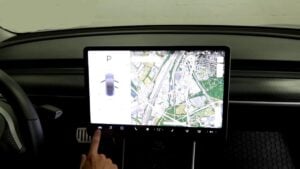
- Go to the settings menu.
- Select “Driving”
- Adjust acceleration, steering weight, regen braking, and stopping mode to suit your preferences.
You’re done!
What is Tesla Chill Mode?
Chill Mode is a Tesla feature that reduces the car’s power and improves range. Since Tesla vehicles have so much torque and can accelerate so quickly, there can be times when owners don’t want that power.
You can choose between a ‘Normal’ option, which allows you to accelerate the Tesla right away, and a ‘Chill’ option, which will enable you to accelerate from a full stop slowly or even a moving stop. Chill mode improves range.
Ludicrous and Insane modes are available on some Tesla vehicles.
What are Tesla Sport and Comfort steering modes?
Sport Mode tightens the steering and makes it more performance-oriented, improving handling and control at higher speeds.
Comfort Mode provides a lighter steering feel by lowering the steering resistance, making turning at low speeds and tight conditions much easier to handle.
What is Tesla’s regenerative braking?
Regenerative braking (also known as regen) converts the vehicle’s kinetic energy into electrical energy stored in the battery, which is then used to drive the vehicle. It’s called braking because it slows the car down.
You can reduce the effect using the above settings, but you can’t turn it off.
The amount of energy returned to the battery through regenerative braking varies depending on the battery’s state and the charge level environment. Regenerative braking can be restricted if the battery is fully charged or the ambient temperature is too cold.
What are Tesla’s stopping modes?
Creep mode is a great feature if you live or drive in a hilly area where you often stop at a light or stop sign. It helps to keep the car from rolling forward or backward on a slope.
If HOLD mode is selected, the vehicle continues to use regenerative braking after decelerating to a low speed and applies Vehicle Hold after coming to a complete stop.
Check these troubleshooting and repair guides for more help on your Tesla.