

Can’t Reset Audi Service Due Reminder
Reviewed/Verified by:

Audi vehicles have an interval of the service recommended by the onboard computer, and it can remind you when the car is due for an oil change or significant maintenance or service. Messages about service are critical because without a periodical intervention, parts wear past their safe limits, and skipping scheduled maintenance can give the manufacturer grounds to deny a related warranty claim. Oil Service Reminders and Service Due Reminders are two service reminders for Audi vehicles. Understanding the two is crucial for any Audi driver to maintain the car in perfect condition.
At a Glance
- Two reminders: Oil Service, about every 10,000 miles or one year, and Service Due (inspection), at longer intervals.
- MMI reset: ignition on, open the car menu, choose Service, then reset the item you serviced.
- If the menu reset is not available, a scan tool can reset it after the work is done.
- Resetting does not record the service. Keep receipts and a written log.
- Skipping scheduled maintenance can give Audi grounds to deny a related warranty claim.
The Two Types of Service Reminders
Oil Service Reminder: About every 10k miles / 365 days
Average Cost $75 to $180
The oil service notification, which is a bit more straightforward, means you need an oil change for your Audi. Oil changes ensure the engine keeps running well, minimizing wearing and staying efficient. This reminder is mostly mileage-based, although your driving behavior can impact the duration of the oil change interval.

🔧 Find out what is actually wrong before you pay someone to guess
Dealer level diagnostics at home with the YOUCANIC UCAN-II Pro.
- ✔ Covers most makes and models, including many luxury brands. Send us your VIN and we will confirm your car before you order
- ✔ Reads every module, not just the engine, so you find the faults a basic reader says are not there
- ✔ Commands the car: test a fan or pump, bleed ABS, retract an electronic parking brake, register a battery
- ✔ No subscriptions. Free lifetime updates, so the price you pay is the whole price
- ✔ Backed by real mechanics in the USA you can email before and after you buy
Featured in The Wall Street Journal
Service Due Reminder: Every 30k miles / 1000 days
Average Cost $500 to $1200

This is all-encompassing and usually includes an oil change over other checkups and repairs. This reminder cannot always be reset via the vehicle and often requires a scan tool like the YOUCANIC UCAN-II Pro scanner. It is Audi’s reminder that your car is due for its major inspection service. Service includes several maintenance items such as brake checks, tire checks, engine diagnostics, and replacement specific well-known wear and tear parts such as serpentine belts, spark plugs, engine air filters, and more. These are essential for Audi’s long-term durability and peak performance and are based on considerable mileage intervals, such as 30,000 or 60,000 miles and 100,000 miles of service.
If you have an Audi and don’t take these maintenance reminders seriously, you put your vehicle at risk of not operating at its best performance. Sometimes, Audi will display a simple “Service Due” message alerting you that it is time for a significant servicing period. This may be a continuation of periodic maintenance, including required fluid changes and system checks, or a requirement for substantial inspection. Knowing how to lock it in and reset this message for different years and models of Audi ensures you can continue safely driving your car or SUV down the road.
Resetting the “Service Due” Message Across Audi Models

On many Audis, notably the A1/A3/A4/A5/A6 (C6/C7), Q3, Q5, Q7, and TT models manufactured since 2010, the MMI will feature an option to clear the “Oil Reminder Due” message but not the Service Due reminder which has to do with the vehicle inspection and checkup. To reset the oil reminder on Audi, follow these steps:
- Turn on the ignition without starting the engine.
- Pull up the car menu in the MMI and select ‘service’ or ‘maintenance’.
- Scroll to the bottom and select the reset (e.g., “Oil Change” “).
- Confirm the reset according to the on-screen instructions.
Using Diagnostic Tools
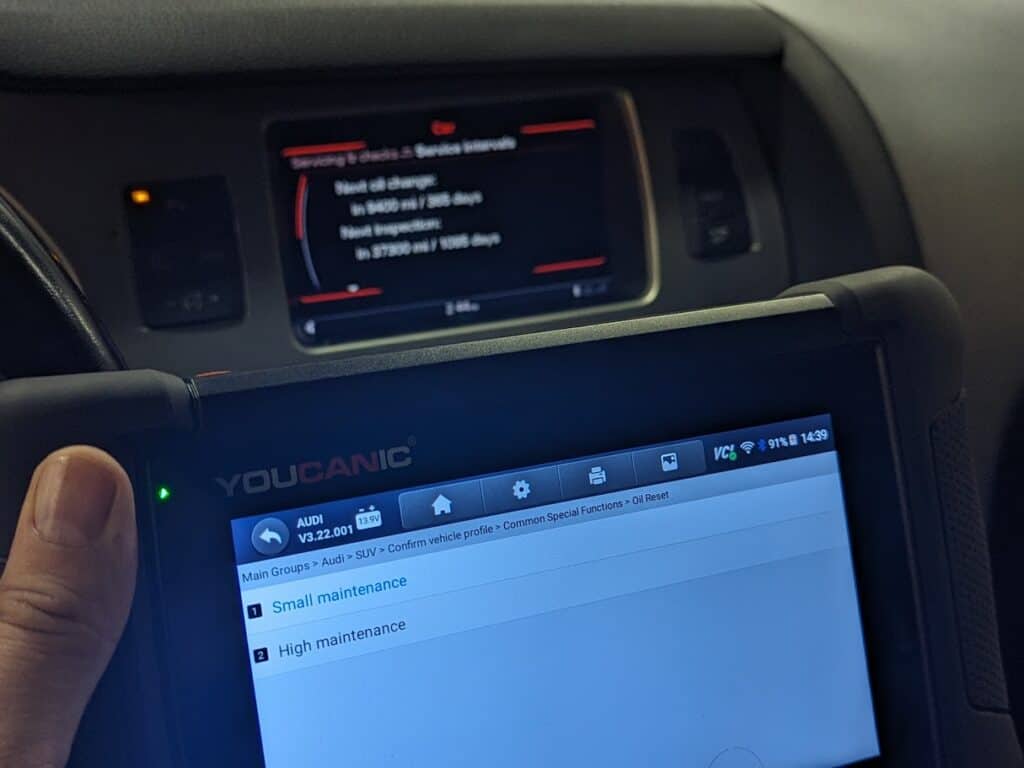
If the MMI method does not work on your car, or for more complete resets, there’s nothing like getting help from scan tools such as the user-friendly YOUCANIC UCAN-II Pro scanner or VCDS (VAG-COM Diagnostic System).
scanner is a handy reset tool that provides an easy, DIY way to clear the ‘Service Due’ light. Plug in, select your vehicle, click ‘Maintenance’ > ‘Oil Reset’ or ‘Major Service’ > ‘Security’ > ‘Major Service Reset’ > ‘Clear,’ and you’re done.
- Small maintenance: Reset the oil change interval.
- Major maintenance: Resets the Service Due light, and you can select the 30k, 60k, 90k, 120k interval, or so on by entering the mileage.
VCDS: Extensive access and resets of service intervals are available for vehicles such as the A6 C7, TT Mk2, and many more. Connect the VCDS to the OBD-II port and go to ‘SRI Reset’ to follow the reset sequence instructions.
OBDeleven: A very useful, app-based diagnostic that toggles shut service messages, including on the 2014 Q7 or the A4 B8.5. Plug in and go to ‘Service’ on the app and hit reset Service Due.
Key Points Across Specific Models
Audi A4 (2013) and A5 (2010) Reset: These two models can usually have their Service Due reset through the MMI and a complete reset after a good in-depth repair. However, a diagnostic scanner like the YOUCANIC will let you know when the system has been completely reset.
Q5 Message Stubbornness: The 2011, 2012, and 2017 Q5 will also display the ‘Service Due’ message. If this is the case, you should make sure the car’s software is up to date first, and if that doesn’t work, use a diagnostic tool to reset the service light.
Conclusion
Resetting the Service Due on an Audi, typically completed every 30,000 miles, is not the same as resetting the oil service reminder, which is completed more frequently at about every 10,000 miles. Resetting the “Service Due” message only clears the reminder. It does not record the service anywhere, so keep your receipts and a written log of the work. If you own a newer Audi, such as the Q5, A4, Q7, or A5 from 2009 to the present, and the menu reset is not available, a scan tool can reset the reminder once the service is done. Doing the work yourself and resetting it with a scanner such as the scanner usually costs far less than a dealer major service.
When the dashboard will not do it
If you arrived here because the normal dash procedure refuses to complete, that is the one genuine case for a tool on this page. Everything else about a service reminder is a menu exercise that costs nothing, and anyone selling you equipment to reset an oil reminder on a car where the dash method works is selling you something you do not need.
A reminder that will not clear usually means the service interval data is held somewhere the dash cannot write to, or something is stored that is blocking it. Reading and resetting it properly needs a tool that talks to the instrument and service modules. For one occasion, rent one for seven days and send it back.
Frequently Asked Questions
Why will my Audi service reminder not reset?
The reset only works with the ignition on and the correct menu or button sequence for your model. Some models also need the service done in the right order, oil service first, then inspection.
Is the oil service reset different from the inspection reset?
Yes. Audi tracks the oil change and the inspection separately, so you may need to reset each one on its own.
Can I reset the service light with a scan tool?
Yes, a scan tool with service reset functions can reset it on supported models when the dash menu will not.





not clear how to reset the service due message on A 2020 Audi Q8