
Access BMW Hidden Secret Menu & Options
Reviewed/Verified by:

The BMW Access Hidden (Secret) Menu is a menu that provides advanced information for BMW vehicles. This menu is not commonly known or part of the standard menu options that can be accessed through the vehicle’s infotainment system. However, it provides valuable information about the vehicle’s systems, components, and performance, allowing technicians and car enthusiasts to diagnose and repair issues more effectively.
At a Glance
- Find your code: add up the last five digits of your VIN.
- Open the menu: ignition to position 1, then hold the trip reset button on the cluster and scroll to the unlock menu.
- Enter the code to unlock the rest of the hidden menus.
- Works mainly on older E series cars with a trip button on the cluster. Newer F and G series cars may show some menus or none.
Accessing the BMW Hidden Menu requires specific knowledge, but once unlocked, it provides a wealth of information and allows for an in-depth analysis of the vehicle’s performance.

Procedure
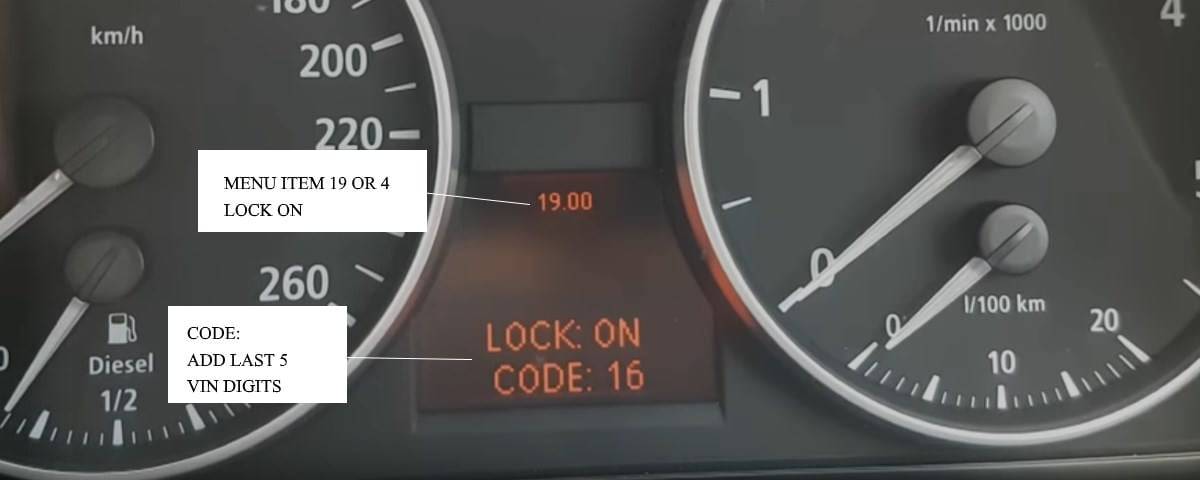
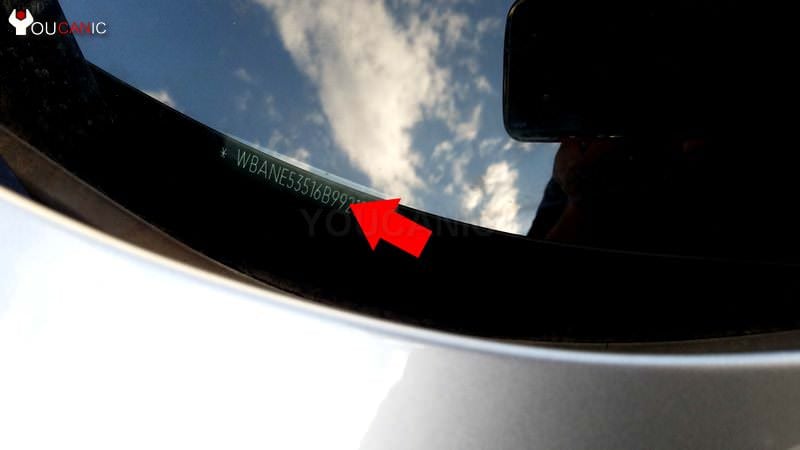
- Figure out the CODE. Add the last five digits of your VIN. This is the CODE that you will need to enter later to unlock your BMW hidden menu. Example: If your BMW VIN is XXXXXXXX22327, the CODE will be 16. (2+2+3+2+7=16 )

Please turn on the key to position I (ACC). If your BMW has a Start/Stop button, press it twice without pressing the brake pedal.

- Press and hold the odometer reset button for ten seconds. Release the button when FGSTNR shows up on the center display. A seven-digit number will appear, showing the last five digits of the VIN.

- Unlock the hidden menu. Press and hold the reset button until item 01 is displayed. Then, toggle the reset button multiple times until you reach Unlock menu. It will be either menu 4 or 19.
- You will see Lock ON: code 00. Use the reset button to change the CODE to the total of the last five digits of your VIN. The hidden menu is now unlocked. If the OBC menu is not UNLOCKED, you can only see menus 01 and 02.

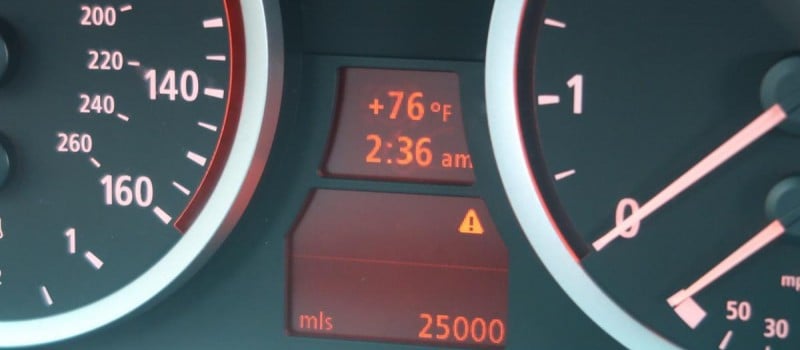
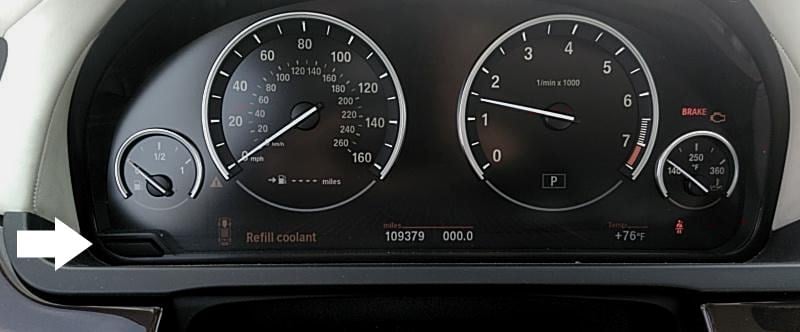
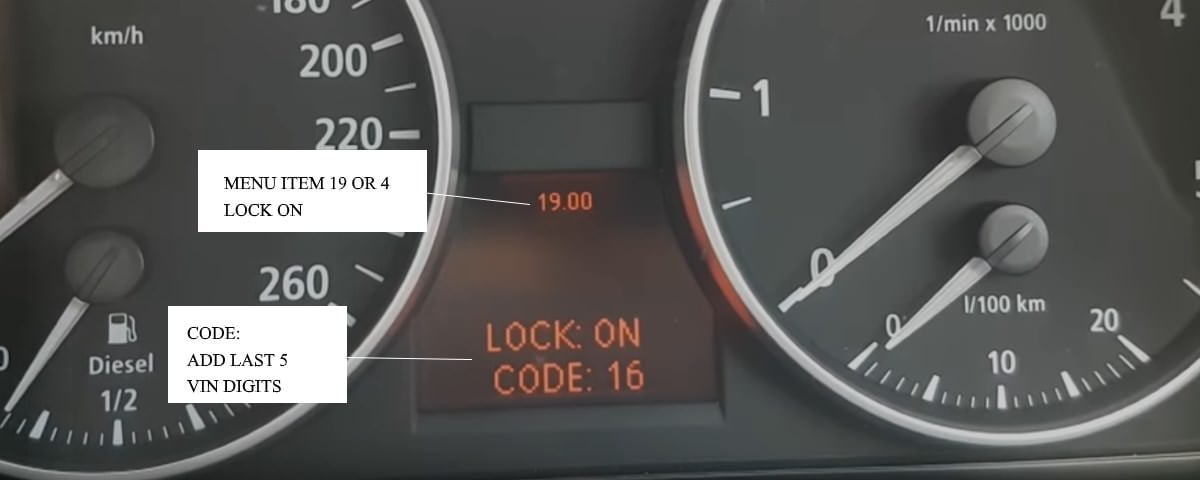
These steps work mainly on older E series BMWs with the trip reset button on the instrument cluster, such as the E81, E82, E87, E88, E90, E60, E61 and E70. Newer F and G series clusters work differently and may show only some of these menus, or none.

🔧 Find out what is actually wrong before you pay someone to guess
Dealer level diagnostics at home with the YOUCANIC UCAN-II Pro.
- ✔ Covers most makes and models, including many luxury brands. Send us your VIN and we will confirm your car before you order
- ✔ Reads every module, not just the engine, so you find the faults a basic reader says are not there
- ✔ Commands the car: test a fan or pump, bleed ABS, retract an electronic parking brake, register a battery
- ✔ No subscriptions. Free lifetime updates, so the price you pay is the whole price
- ✔ Backed by real mechanics in the USA you can email before and after you buy
Featured in The Wall Street Journal
Understanding BMW Hidden Menu
01.__
01.00: FGSTNR (vehicle identification number)
01.01: K-ZAHL W/T
01.02: BMWTNR
01.03: COD DIA (diagnostic codes)
01.04: KI HSTLDATUM
01.05: HW AEI (hardware version)
01.06: SW (software version)
01.07: KODIERDATEN (coding date)
01.08: CAN Digital
02.__
02.00: KI TEST (instrument cluster test)
03.__
03.00: UNBELEGT (not used)
04.__
04.00: VERM-MOM (current fuel consumption)
04.01: VERM-MOM (current fuel consumption)
04.02: D-VERB1 LIT (data used for calculating average fuel consumption)
04.03: D-VERB1 WEG (data used for calculating average fuel consumption)
04.04: D-VERB2 LIT (data used for calculating average fuel consumption)
04.05: D-VERB2 WEG (data used for calculating average fuel consumption)
05.__
05.00: RW-VERB (fuel consumption used to calculate range)
05.01: RW-MOM (calculated range)
06.__
06.00: TANK L R S (fuel level readouts from the left sensor, right sensor, and estimated sum)
06.01: TANK-ANZ PH
06.02: TANK-ADC L R (raw data from fuel level sensors)
07.__
07.00: KTMP-MOM (coolant temperature)
07.01: ATMP-MOM (ambient air temperature, momentary)
07.02: ATMP-ADC (ambient air temperature, average)
07.03: N-MOT-MOM (engine speed RPM)
07.04: N-VWF-MOM (current start position of tachometer yellow field)
08.__
08.00: V-EFF (real current speed)
08.01: V-ANZ (fake current speed to be shown on the speedometer)
08.02: V-SZ (target speed set by the cruise control)
08.03: DGESCH1 WEG
08.04: DGESCH1 ZEIT
08.05: DGESCH2 WEG
08.06: DGESCH2 ZEIT
09.__
09.00: UB (battery voltage)
10.__
10.00: KM / WOCHE
10.01: GELB CBS H A
10.02: SC-STATUS
10.03: CBS-MODE
10.04: TAG-ZAEHLER
11.__
11.00: ZEIT-EINH (12h / 24h clock mode)
11.01: WEG-EINH (distance and speed units)
11.02: TEMP-EINH (temperature units)
11.03: VERB-EINH (fuel consumption units)
12.__
12.00: V-ANKUNFT (average speed used for calculating ETA)
12.01: ANK_ZEIT (ETA)
13.__
13.00: AUDIO (Sound test: instrument cluster speaker-test / Press button to play BLINKER, ACC Gong, CCG, and DG sounds)
14.__
14.00:
14.01: FSP01
14.02: FSP02
14.03: FSP03
14.04: FSP04
14.05: FSP05
14.06: FSP06
14.07: FSP07
14.08: FSP08
14.09: FSP09
14.10: FSP10
15.__
15.00: PORT 00h
15.01: PORT 01h
15.02: PORT 02h
15.03: PORT 03h
15.04: PORT 04h
15.05: PORT 05h
15.06: PORT 06h
15.07: PORT 07h
15.08: PORT 08h
15.09: PORT 09h
15.10: PORT 0Ah
15.11: PORT 0Bh
16.__
16.00: DIMMRAD-CAN
16.01: PHOTO-ADC
16.02: DIMM-PWM S Z
16.03: DIMM-PWM D K
17.__
17.00: DISP-HEIZ
17.01: NTC1 NTC2
17.02: KONTR-PWM
18.__
18.00: CC-TEST? (warning lights test)
19.__
LOCK (hidden menu lock)
20.__
20.00: KORR-VERBR (fuel consumption correction factor)
20.01: 1er KORR (add 1 to correction factor)
20.02: 10er KORR (add 10 to correction factor)
20.03: 100er KORR (add 100 to correction factor)
21.__
21.00: RESET? (resets date, time, and trip computer memory)
These instructions on entering the BMW hidden menu will work on various modules, including 1, 3, 5, 6, 7, X1, X3, and X5 models. You can access various service tests when you access a BMW hidden menu. This is helpful if you are trying to test/diagnose the instrument cluster, issues with your car, coolant temperature, or check real speed.
For example, you can test that the instrument cluster is working properly. Check the gauges, display raw sensor data, and even perform some adjustments.
Frequently Asked Questions
Is there a hidden menu on my BMW?
Most BMW 1999 and newer have a hidden On-Board Computer menu. Models with navigation have a hidden menu for the maps, and cars with iDrive may have a hidden menu for the iDrive in addition to the OBC hidden menu.
Why can’t I enter the hidden menu?
Make sure the key is turned with only one click. This is known as the ACC or accessory position. Don’t start the engine. If your car has a START button, press the START button twice without pressing the brake pedal.
Where do I get the code to unlock the hidden menu on my BMW?
Add the last five digits of your Vehicle Identification Number. Your BMW VIN is shown on the lower right corner of the windshield or the driver’s door frame.
What the hidden menu is actually useful for
Most of the tests above are of academic interest. A handful are genuinely worth knowing. Test 09 shows battery voltage as the cluster sees it, which is the quickest way to spot a charging problem without opening the hood. Test 07 gives coolant and ambient temperature as real numbers rather than as a damped gauge needle, so you can watch what the engine is actually doing. Test 06 shows the left and right fuel level sender readings separately, which identifies a failed sender on a car with an erratic fuel gauge.
Test 08 is the one people enjoy most. It displays real road speed alongside the speed being shown on the dial. Manufacturers are required to ensure a speedometer never reads below true speed, so they bias it upward, and on most BMWs you will find the dial reading a few percent optimistic. That is normal and not a fault.
If the menu will not open, it is probably locked. Many cars require the lock to be cleared before the full set of tests becomes available, and on some models that means entering the last five digits of the vehicle identification number when prompted. Test 19 is the lock itself.
Know what it cannot do
This is the part worth being clear about, because it is where most people are disappointed. The hidden menu is built into the instrument cluster and shows what the cluster knows. It is not a diagnostic tool. It will not read stored fault codes from the engine, transmission, ABS, airbag or body modules, it cannot clear a warning light, and it will not tell you why the check engine light is on.
If that is what you came for, you need something that talks to the individual control modules. A full system scanner such as the YOUCANIC UCAN-II Pro reads and clears codes in the individual modules on supported BMW models, which is a different job from anything the cluster menu offers.
A note of caution before you start pressing buttons. The majority of these tests only display information and are completely safe. A small number do not. Test 21 resets the date, time and trip computer memory, and the consumption correction factor in test 20 changes how the car calculates fuel economy. Read what a test does before you confirm it, and leave anything you do not recognize alone.
Availability varies by generation. These instructions work reliably across the E series cars listed above. On later F and G series models with fully digital displays the cluster menu is progressively restricted or absent, and the equivalent information is only reachable with diagnostic software.
Related Resources
- Tips and tricks to get the secret codes out of your BMW carsaddiction.com
- Test Mode: Hidden Codes in your car! Bimmerforums.com
- The 3rd and final hidden menu [hidden OBC menu] m5board.com
- TIMM’S BMW E38 UNLOCKING THE ON-BOARD-COMPUTER (OBC) meeknet.co.uk
- Exploring the E39 OBC ideaphile.com
- How to enter hidden menu in BMW E90 E91 E92 E93 (3 Series service test mode) Mr-fix on youtube.com
More guides: browse all of our BMW repair and troubleshooting guides.



Yes, if the thermostat is stuck closed, it can certainly cause the heat to not work properly. The thermostat plays a crucial role in regulating coolant flow through the engine and the heater core, which is responsible for providing warm air to the interior of the vehicle. If the thermostat is stuck closed, it restricts the flow of coolant to the heater core, resulting in the absence of warm air and only cold or cool air being blown out of the vents, even at the highest temperature setting.
where is the oil temp in the hidden menu please? I don’t see it on the list above anywhere?
would the thermostat being stuck closed also cause the heat not to work? I’m only getting cold or cool air at the hottest setting. and do you know, on this secret menu discussed on this page, which option is the oil temp? I can only find coolant temp? ty again!
well, I had a guy check it out and he said from squeezing the hose coming off the water pump you can tell it’s working. today he suggested we just replace the thermostat and waterpump at the same time. parts are only like 300 and he’s going to do the labor for 300 expecting it to be a 4 hour job.
I guess I should just go ahead with doing both, my concern is we make this repair and the overheating continues. by the way I just want to thank you for replying, I’m extremely stressed over this and don’t know what to do so any advice is really appreciated!
How do you know the water pump is working? Also thermostat stuck closed could be the culprit as well.
the water pump is working, and in that secret menu I’ve been able to find the coolant temp which is in normal range. how do I view the oil temp in that menu?
Sorry to hear that. Probably bad water pump but don’t drive it like that as you will blow the head gasket.
I need help, bad. I bought a 2004 645Ci from a private party, it seemed to run great! Right after I paid for it I start getting warnings on the screen,
“Engine overheating, drive moderately to cool engine” the “Engine overheated, turn off the engine, do not open the hood danger of being scalded” something similar to that.
The oil temp gauge would shoot to the highest during this, them shoot back to the lowest and the message disappears, then 5 minutes or a hour later, it’s random, it happens again!
In addition the heater doesn’t work, only blows cold air at the hottest setting? Is there a secret menu on this car to detect the coolant and oil temperature? Is this a computer error or is it really overheating? There are no signs of an overheated engine when I open the hood yeah its hot but i had driven 10 or 20 miles? Please help!