YOUCANIC UCAN-II Pro vs. BlueDriver Pro
With over 60,000 Amazon reviews, the BlueDriver Pro is one of the most widely recognized Bluetooth OBD-II scanners in North America. Founded in 2013, this brand is best known for making vehicle diagnostics accessible on any smartphone. Built by Lemur Vehicle Monitors in Canada, this pocket-sized scanner is a very useful tool that has helped millions of car owners understand their check engine lights and get vehicle-specific repair guidance without an expensive trip to the shop.
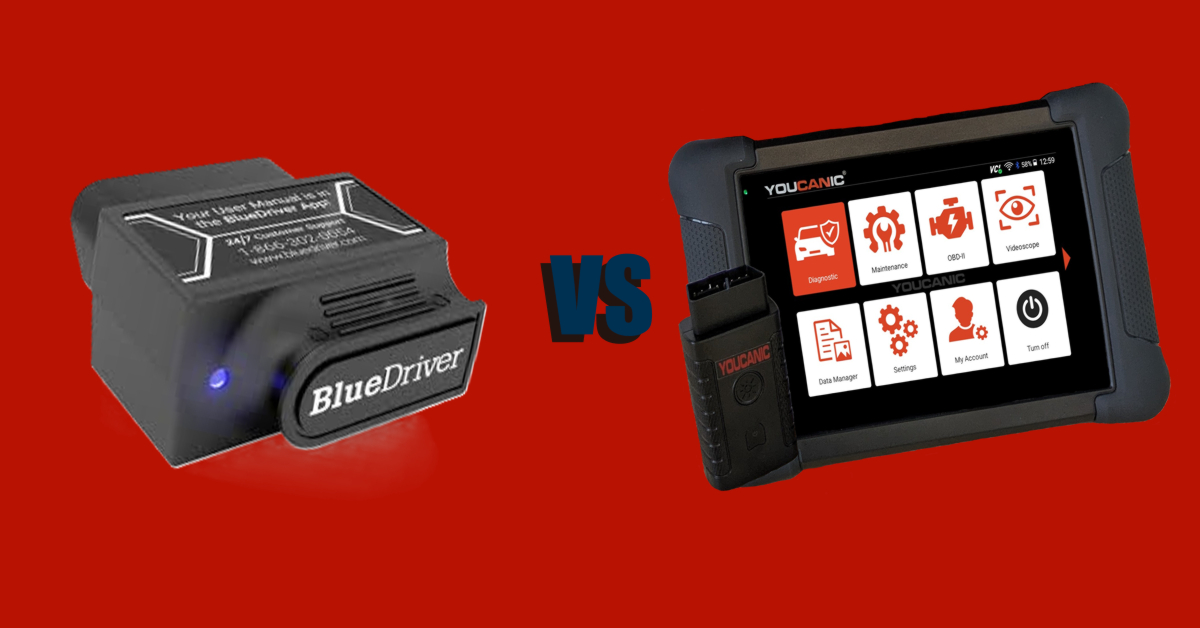
This comparison requires slightly different framing than the others in our series, because the BlueDriver Pro is not a full-system bidirectional diagnostic platform. Instead, it is a smart Bluetooth dongle that pairs with a smartphone app. Comparing it to the YOUCANIC UCAN-II Pro in terms of raw feature counts is like comparing a quality multimeter to an oscilloscope. They occupy different categories, serve different primary use cases, and attract different buyers.
What this article will do is explain exactly what each scanner does, where BlueDriver genuinely excels, where the UCAN-II Pro is the only right answer, and — most importantly — how to decide which one belongs in your toolbox, or whether you might actually want both.

🔧 Stop paying the dealer for every warning light
Get dealer level diagnostics at home with the YOUCANIC Full System Scanner.
- ✔ Works with all makes and models, including most luxury brands
- ✔ Topology map view shows all vehicle modules on one screen for faster diagnostics
- ✔ Bi directional controls to test fans, pumps, actuators and more so you do not have to guess
- ✔ Special resets and calibrations such as ABS bleed, EPB service, battery registration and more
- ✔ Free lifetime updates with no recurring fees
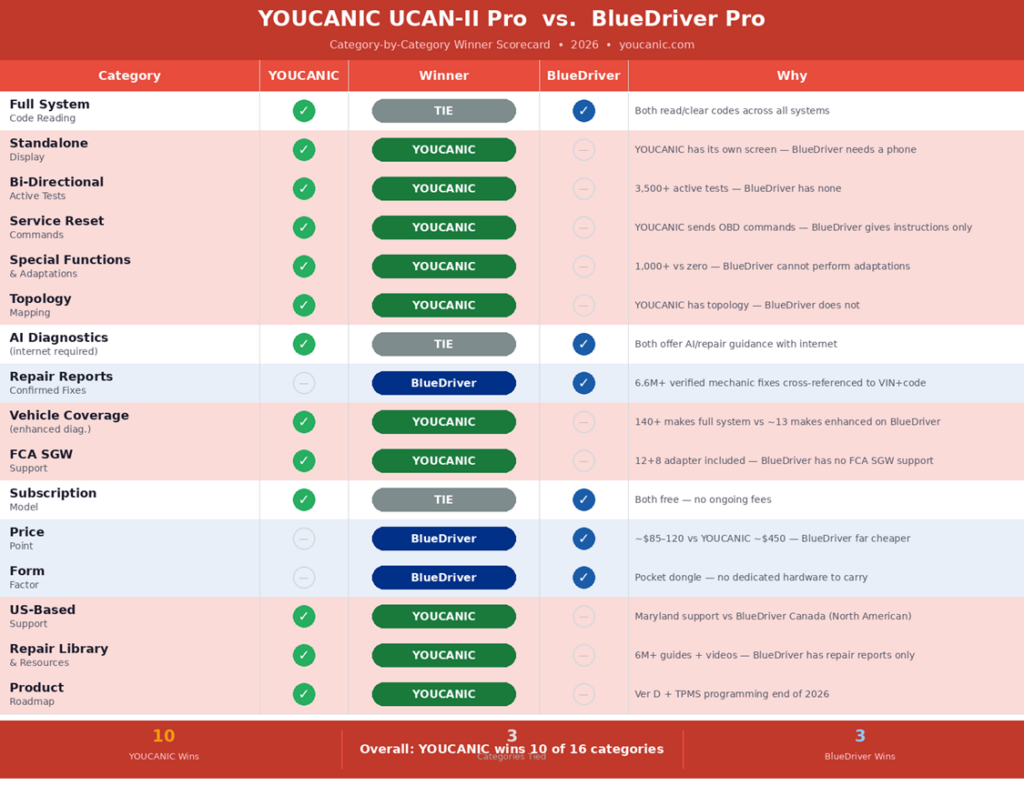
Category-by-Category Winner Scorecard
BlueDriver wins three real categories: price, form factor, and Confirmed Fix repair reports:
Full Specification Comparison
|
Feature |
YOUCANIC UCAN-II Pro |
BlueDriver Pro |
|
Manufacturer |
YOUCANIC — Towson, Maryland, USA |
Lemur Vehicle Monitors — Canada |
|
Founded |
December 2015 |
2013 |
|
Form Factor |
Standalone tablet + Bluetooth VCI |
Pocket Bluetooth dongle — phone required |
|
Price |
~$500 |
Pro: ~$85–120 | Next-Gen: ~$120 |
|
Subscription |
✅ Free lifetime updates — no fees |
✅ No subscription — one purchase |
|
Standalone Display |
✅ Built-in touchscreen tablet |
❌ No display — requires smartphone/tablet |
|
Full System Code Read |
✅ All modules, 140+ makes |
✅ All modules — enhanced on ~13 major makes |
|
Topology Mapping |
✅ Included |
❌ Not available |
|
Bi-Directional Tests |
✅ 3,500+ active tests |
❌ No bidirectional capability |
|
Service Reset Commands |
✅ 40+ OBD-commanded resets |
⚠️ Instruction-based only — not OBD commands |
|
✅ 1,000+ adaptations, teach-ins |
❌ Not available |
|
|
AI / Repair Guidance |
✅ AI + repair guides (internet required) |
✅ Confirmed Fix Reports (internet required) |
|
Repair Report Database |
Repair library + AI |
✅ 6.6M+ verified mechanic fixes cross-ref. to VIN |
|
FCA SGM Access |
✅ 12+8 adapter (included, no fee) |
❌ No FCA SGM support |
|
CAN-FD / DoIP |
✅ Supported |
⚠️ Not confirmed on Pro / Next-Gen |
|
Works Without Phone |
✅ Yes — fully standalone |
❌ No — phone required for all functions |
|
iOS + Android |
✅ Compatible |
✅ iOS and Android |
|
US/NA Support |
✅ Maryland USA — phone/email/chat |
✅ Canada-based — North American |
|
Repair Library |
✅ 6M+ visitors, guides + videos |
⚠️ Repair reports + ‘Fear No Fix’ video series |
|
Product Roadmap |
✅ Version D — full TPMS programming, 2026 |
Not publicly disclosed |
* BlueDriver Enhanced Diagnostics are available on approximately 13 major makes. Service functions on BlueDriver are instruction-based. The app provides step-by-step manual procedures rather than sending OBD commands to the vehicle. No bidirectional active test capabilities are available on any BlueDriver model.
These Tools are not the Same
The most important thing to understand before comparing these two scanners is that they sit in completely different product categories. Treating them as identical products, judged purely by spec count, would completely overlook what each tool actually is.
|
BlueDriver Pro A pocket-sized Bluetooth dongle (~$85–120) that plugs into your OBD-II port and sends diagnostic data to a free smartphone app. The app provides enhanced code reading across major systems, ‘Confirmed Fix’ repair reports cross-referenced against 6.6M+ verified mechanic repairs, and live data streaming. Primary use case: Diagnosing check engine lights and understanding what codes mean on your specific vehicle, with verified repair guidance from real mechanic fixes. There is no standalone display, bidirectional tests, or service reset commands. A phone is required for all functions. Price: ~$85–120, no ongoing fees. |
|
The YOUCANIC UCAN-II Pro A full standalone bidirectional diagnostic tablet (~$500) with its own screen, processor, and Bluetooth VCI dongle. It runs complete full-system diagnostics with 3,500+ active tests, 1,000+ special functions, topology mapping, AI guidance, 40+ service reset commands, and free lifetime updates. Primary use case: Full-depth vehicle diagnostics and post-repair procedures covering everything from fault finding to module adaptation and ECU teach-ins after component replacement. It works without a phone, comes with a 12+8 FCA adapter, and is backed by a quality US-based customer support team. Price: ~$500, no ongoing fees. |
Where BlueDriver Genuinely Wins
1. Confirmed Fix Repair Reports: A Unique Strength
BlueDriver’s ‘Confirmed Fix’ repair reports are one of the most useful features in the OBD-II scanner market at any price point. After reading a trouble code, the BlueDriver app cross-references your exact VIN, year, make, model, and trouble code against a database of over 6.6 million repairs verified by ASE-certified technicians, showing you the most common fixes for that exact code on your exact vehicle, ranked by frequency and cost.
Why this matters: A P0420 catalyst efficiency code on a 2019 Honda CR-V will have different repair paths than the same code on a 2016 Ford F-150, so instead of telling you to ‘replace the catalytic converter,’ BlueDriver’s app will tell you what Honda CR-V owners with that code actually needed, which could be an O2 sensor, a software update, or a weld repair, which are all far cheaper than a new catalytic converter.
While YOUCANIC has thousands of repair resources on its website, and the AI mechanic built into every scanner provides fault code guidance, the BlueDriver Confirmed Fix database is much more advanced. It is a statistical cross-reference of actual mechanic repairs on actual vehicles, not an AI explanation. Both approaches are useful; BlueDriver’s is more narrowly focused and arguably more statistically grounded for common faults on well-covered makes.
2. Price: ~$85–120 vs ~$500
The BlueDriver Pro, priced at ~$85–120, is significantly cheaper than a new UCAN-II scanner. For a buyer whose primary need is understanding check engine lights, reading enhanced codes, and getting repair guidance on a domestic or mainstream Asian vehicle, BlueDriver scanners are a quality tool at a price that is hard to argue with.
3. Form Factor: Pocket-Sized Convenience
The BlueDriver Pro is about the size of a large matchbox, perfect for keeping in your glove compartment, a gym bag, or a jacket pocket. What makes it even better is the fact that it never needs to be charged. Just plug it in, open the app, and start scanning! For someone who wants basic diagnostic capabilities at their fingertips without having to drag a big, clunky scanner around, BlueDriver’s size and convenience make it a perfect choice, especially for quick checks on the road or at a used car dealer.
BlueDriver’s Critical Limitations for DIY Mechanics
No Bidirectional Active Tests
The BlueDriver Pro has no bidirectional capabilities. It cannot send commands to vehicle components, such as activating the ABS pump, cycling the throttle body, testing fuel injectors, triggering the cooling fan, retracting electronic parking brakes, or commanding any actuator in any vehicle system. BlueDriver’s own Amazon Q&A confirms this — the company has stated they have not implemented bidirectional in the app.
For a DIY mechanic who wants to verify that a component actually responds to commands, the BlueDriver is simply the wrong tool. Active tests are the difference between hypothesis and fact. The UCAN-II Pro performs 3,500+ active tests across 140+ makes; BlueDriver performs zero.
Service Resets Are Instructions, Not Commands
This is the most misunderstood limitation of BlueDriver scanners: When BlueDriver’s app shows you a ‘service function,’ like an oil light reset, TPMS reset, or battery registration, it is not sending an OBD-II command to your vehicle’s ECU. Instead, it provides step-by-step instructions for performing the reset manually through your vehicle’s menus, steering wheel buttons, or ignition key sequences.
On vehicles with manual reset procedures: many Toyotas, Hondas, and domestic trucks, this works perfectly well, and the BlueDriver instructions are clear and vehicle-specific. On vehicles that require an actual scanner command to perform a reset, like most European cars and newer domestic vehicles with electronic EPBs, BlueDriver’s instructions will not be able to help users complete the task. For things like battery registration on Mercades and BMW vehicles, you will need a more advanced scaner that can send a command.
UCAN-II Pro scanners send signals to the car’s different systems, and is able to perform 40+ service resets.
|
Which vehicles need commanded service resets vs manual procedures? Manual procedures (BlueDriver instructions are adequate): → Most Toyota/Lexus oil resets (ignition key sequence) → Many Honda/Acura oil resets (instrument cluster menu) → Many Ford/GM oil resets (trip computer menu) Scanner command required (BlueDriver instructions will not work): → Electronic Parking Brake retraction on any make (requires EPB command) → Battery registration on BMW, Mercedes-Benz, Audi/VW → DPF regeneration on diesel vehicles → Oil reset on European makes (Benz, BMW, VAG) — requires scan command → TPMS sensor programming on any make → ABS bleeding sequences on modern vehicles → Injector quantity correction coding after replacement Verify your vehicle’s specific requirements before assuming BlueDriver suffices. |
1,000+ Special Functions vs Zero
After replacing a component on a modern vehicle, the repair is not complete until the scanner communicates with the ECU about the change. A new throttle body needs a throttle body relearn; a new battery needs to be registered to the BMS; a new ABS hydraulic unit needs a module adaptation; and a new steering rack needs steering angle sensor calibration.
The BlueDriver Pro cannot perform any of these procedures. It has no special function capabilities, which means no adaptations, no teach-ins, no calibration sequences, and no module-specific coding. After a scan, BlueDriver tells you what needs replacing, but can’t complete the post-repair procedure that makes the replacement actually work on a modern vehicle.
The YOUCANIC UCAN-II Pro has 1,000+ special functions covering exactly these scenarios across 140+ makes. For a home mechanic who actually replaces parts, having a scan tool that can run adaptations makes all the difference.
The Phone Dependency: What It Means in Practice
The BlueDriver Pro requires a smartphone or tablet to work. There is no display or processor on the dongle itself. Every scan, every code, every live data stream has to be accessed through your phone.
For many users, this doesn’t raise too many problems. Everyone already keeps their phones in their pocket, and the BlueDriver app was designed to be very easy to use. However, there are some scenarios where phone dependency can become a problem:
- Battery drain: An extended diagnostic session in cold weather with a phone that already has a low battery can end a scan prematurely.
- Workshop use: Handing a phone or tablet to a customer to show them their codes is awkward. Having a dedicated scanner with its own screen looks more professional.
- Gloved or greasy hands: Using a touchscreen phone with greasy hands is difficult and can lead to a lot of headaches.
- No phone nearby: A scanner you can grab from the toolbox and plug in without having to find and unlock your phone is simpler for quick checks.
The UCAN-II Pro is a standalone device. It has its own screen, processor, and interface, no phone required. It also has Bluetooth VCI for wireless freedom when needed.
FCA Vehicles: BlueDriver is No Good
The BlueDriver Pro does not offer support for the Security Gateway Module (SGM) found on all 2018+ RAM, Jeep, Dodge, and Chrysler vehicles, which blocks advanced diagnostic access, bi-directional tests, service reset commands, and module-level functions. Without an SGM bypass route or AutoAuth support, the BlueDriver is limited to basic generic OBD-II code reading on these makes.
In contrast, every UCAN-II Pro scanner comes with a 12+8 bypass cable in the box, which grants full access to FCA vehicles without an AutoAuth subscription, granting owners access to their own car’s different modules from day one.
What BlueDriver Does Better Than Most People Realize
Up to this point, we have made a case for YOUCANIC’s diagnostic depth, but our goal in this comparison was not to turn people away from a very handy piece of equipment. Let’s talk about what BlueDriver does well:
- Confirmed Fix database: 6.6 million verified mechanic repairs cross-referenced to VIN and fault code. This database sets them apart from the rest, as even YOUCANIC can’t fully replicate what BlueDriver offers.
- Enhanced diagnostics on covered makes: On Ford, GM, Toyota, Honda, BMW, and the other roughly 13 makes with full enhanced support, BlueDriver can run a more in-depth scan, reading ABS, SRS, transmission, body, and all other modules.
- App quality: The BlueDriver app is consistently praised for its polish, intuitiveness, and reliability. It is one of the best-designed OBD-II apps currently on the market.
- Live data while driving: The dongle stays connected while driving, allowing users to monitor real-time parameters on their phone’s screen, and data-log sensor behavior to identify intermittent faults that only appear under load. This is a great workflow advantage for diagnosing drive-cycle-dependent faults.
- ‘Fear No Fix’ video content: BlueDriver’s repair video series provides practical guidance for common DIY repairs. It is not as deep as YOUCANIC’s growing repair library, but it is purpose-built and well-produced.
- No subscription, ever: One purchase, full access, no fees. BlueDriver has maintained this model since launch, just like YOUCANIC.
The Case for Owning Both
These tools are complementary. Many serious DIY mechanics own a BlueDriver and a full-system bidirectional scanner.
The BlueDriver lives in the glove box and gets plugged in for a quick scan whenever a light comes on. It provides the Confirmed Fix report in just 30 seconds and helps decide whether the issue needs immediate attention or can wait until the weekend.
The UCAN-II Pro lives in the toolbox. It comes out when you are doing the actual repair: Brake bleeding, battery registration, teach-ins, and resets.
If a budget requires choosing only one, the BlueDriver is a great entry point for someone just starting down the road of vehicle repairs, while the UCAN-II Pro is a better-suited tool for a home mechanic.
Pros and Cons
|
✅ YOUCANIC UCAN-II Pro — Pros |
❌ YOUCANIC UCAN-II Pro — Cons |
|
Standalone tablet — no phone required Topology mapping — visual module status 3,500+ bidirectional active tests — verify components work 40+ OBD-commanded service resets — sends actual ECU commands 1,000+ special functions, adaptations, and teach-ins AI diagnostic guidance (internet required for recommendations) 140+ makes with full enhanced diagnostics 12+8 FCA SGM adapter included in box Free lifetime updates — no annual fees 6M+ visitor repair library + how-to videos US-based support — Maryland phone/email/chat Version D coming — full TPMS sensor programming end of 2026 |
~$500 — approximately 4–5× more expensive than BlueDriver Larger form factor — dedicated scanner to carry and store AI requires internet (same as BlueDriver) |
|
✅ BlueDriver Pro — Pros |
❌ BlueDriver Pro — Cons |
|
~$85–120 — most accessible price in this series 6.6M+ Confirmed Fix reports — VIN+code cross-referenced repairs Pocket-sized dongle — fits in glove box, always available No subscription, no add-ons — one purchase forever Works while driving — stays connected for real-time data Excellent app — polished, intuitive, well-reviewed Enhanced diagnostics on ~13 major makes North American company (Canada) — accessible support 60,000+ Amazon reviews — proven reliability |
No standalone display — phone required for all functions No bidirectional active tests — cannot command vehicle components Service resets are instructions only — not OBD commands No special functions or module adaptations No topology mapping Enhanced diagnostics on ~13 makes — not 140+ No FCA Security Gateway Module support No repair for post-replacement procedures (adaptations, teach-ins) No product roadmap publicly disclosed |
Who Should Buy Each Scanner?
|
Buy the YOUCANIC UCAN-II Pro if: → You do your own repairs and need active tests to verify components → You need OBD-commanded service resets — EPB, BMS, DPF, injector coding, etc. → You own a 2018+ FCA vehicle — only YOUCANIC includes the 12+8 adapter → You need 1,000+ special functions for post-replacement procedures → You want topology mapping to visualize all modules at once → You need coverage across 140+ makes, not just ~13 with enhanced diagnostics → You want a standalone scanner that works without your phone → You want a repair library that goes from code to completed repair |
|
Buy the BlueDriver Pro if: → You primarily want to understand check engine lights and get repair guidance → The Confirmed Fix database of 6.6M+ verified repairs is specifically valuable to you → Your vehicle is on one of the ~13 makes with full enhanced diagnostics → Budget is tight and you need the lowest entry cost to diagnostic capability → You want something pocket-sized that lives in the glove box permanently → You do not do your own repairs and do not need bidirectional or service resets → You drive a vehicle without FCA SGM restrictions |
|
Consider owning both if: → You want glove-box instant diagnostics (BlueDriver) AND full repair capability (YOUCANIC) → You are building up your DIY toolkit and want the entry point now and the full tool later → You want BlueDriver’s Confirmed Fix reports AND YOUCANIC’s bidirectional depth → The combined cost (~$600) is acceptable given what each tool does uniquely well |
Our Verdict
|
YOUCANIC UCAN-II Pro — The Right Tool for DIY Home Mechanics Who Repair Their Vehicles Wins 10 of 16 categories • 3 tied • BlueDriver wins 3 (price, form factor, Confirmed Fixes) Key YOUCANIC advantages: Bidirectional • Service commands • 1,000+ functions • 140+ makes • FCA included |
The BlueDriver Pro is a great tool. It deserves its 60,000+ reviews and its position as the most widely recommended Bluetooth OBD-II scanner for general use. With an easy-to-navigate app, an extensive Confirmed Fix database, and a low price point, it is an accessible, no-subscription, pocket-sized diagnostic tool that has helped millions of car owners avoid unnecessary trips to the shop.
What it cannot do is be a full diagnostic platform. It has no bidirectional capability, no OBD-commanded service resets, no special functions or module adaptations, no standalone display, and no FCA SGM support. For a vehicle owner who simply wants to understand their dashboard lights and make informed repair decisions, it is the right tool at the right price.
For a DIY home mechanic who actually does the repairs, the BlueDriver is a great starting point. The YOUCANIC UCAN-II Pro is there to finish the job, with active tests that verify whether a component works, service commands that complete the reset after a repair, 1,000+ special functions that adapt the ECU to the new part, and a U.S.-based support team you can call if you need help. That is what makes a scanner worth $500 instead of $100.