
Hyundai Front Brake Pads & Rotor Replacement
Reviewed/Verified by:

Worn brake pads announce themselves with squealing or grinding, longer stopping distances, a brake pedal that sits lower than it used to and often a wear warning light. What they do not cause is a soft or spongy pedal. If your pedal feels springy, travels further than it should or sinks slowly toward the floor, that is air in the hydraulic system, a fluid leak or a failing master cylinder, and fitting new pads will not fix it. Find that cause before driving the car. If your symptoms are wear related, the procedure below covers replacing the front brake pads and rotors on a Hyundai.
At a Glance
- Wear signs: squeal or grinding, longer stops, a lower pedal, a wear light.
- A soft or sinking pedal is not a pad problem; find the hydraulic fault first.
- Shown on a 2013 Sonata; similar on the Accent, Santa Fe and Tucson.
- Torque used here: caliper guide bolts 20 lb-ft, caliper bracket 70 lb-ft; confirm for your model.
- Pump the pedal until firm before driving, then bed the new pads in.
The videos and pictures are from a 2013 Hyundai Sonata. These instructions should still help you replace the brake pads on other Hyundai models such as Accent, Santa Fe, Sonata, Tucson, etc.
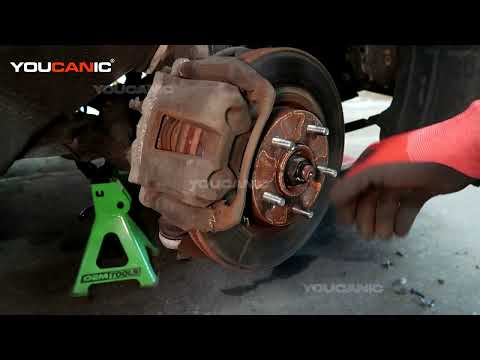
What you will need
- Hyundai Front Rotor Brake Pad Set
- 10 to 17mm Metric Sockets
- Ratchet
- Torque Wrench
- Flathead screwdriver
- Jack
- Jack stands
Procedure
How to change front brake pads and rotors on a Hyundai.

🔧 Find out what is actually wrong before you pay someone to guess
Dealer level diagnostics at home with the YOUCANIC UCAN-II Pro.
- ✔ Covers most makes and models, including many luxury brands. Send us your VIN and we will confirm your car before you order
- ✔ Reads every module, not just the engine, so you find the faults a basic reader says are not there
- ✔ Commands the car: test a fan or pump, bleed ABS, retract an electronic parking brake, register a battery
- ✔ No subscriptions. Free lifetime updates, so the price you pay is the whole price
- ✔ Backed by real mechanics in the USA you can email before and after you buy
Featured in The Wall Street Journal
- Set the parking brake and place the transmission in Park.
2. Open Brake Fluid Reservoir. Start by opening the hood and removing the brake fluid reservoir cap. This is necessary and will allow you to press the caliper pistons. You must do this to fit the brake caliper’s new brake pads.
3. Loosen Lug Nuts. Before you raise the car, make sure to break loose the lug nuts. Please do not remove them yet; loosen them.
4. Raise Vehicle. Use a floor jack to raise one of the front wheels. Carefully raise the front of your car with a jack and then support the car with jack stands.
5. Remove tire. Remove lug nuts and keep them safe so you don’t lose them. A secure vehicle with jack stands. Always secure the vehicle with jack stands. Don’t rely on the hydraulic jack alone.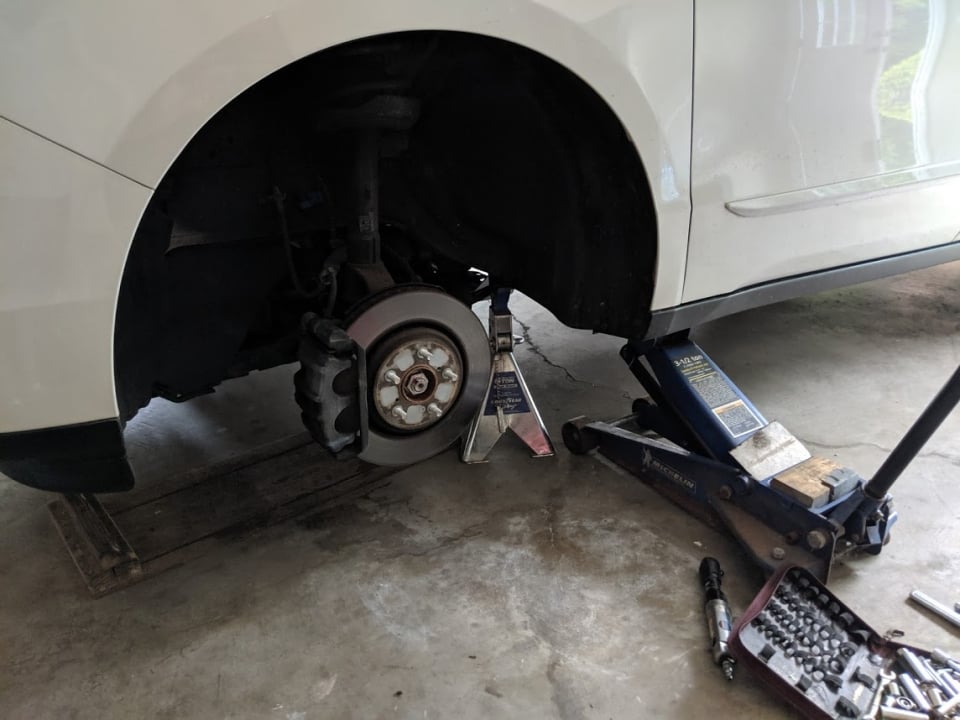
6. Remove Brake Caliper Bolts. Locate the two bolts on the back of the front brake caliper. Remove both bolts. Use a 14mm socket and a ratcheting wrench to loosen the lower and upper caliper bolts on the caliper’s back and pull each bolt slightly out. You need to slide them out to allow room to remove the caliper. Secure the caliper.
7. Remove the Brake caliper. Use a wire to secure the brake caliper. Do not let the brake caliper hang, as this can cause damage to the brake hose. Lift the caliper off the brake pads and tie it with a rope to the strut to keep it from falling and void, putting tension on the brake line.
8. Remove Brake Pads Once you remove the two bolts, you will pull out the caliper and remove the brake pads. Loosen the two rotor retaining bolts using a Phillips screwdriver. These bolts can be difficult to come out of and require that you use a Hand Impact Tool Set.
9. Remove Caliper Bracket: Before removing the rotor, remove the caliper bracket carrier. It is held in place with two bolts. These are 17mm bolts. Remove the bolts using a breaker bar.
10. Remove the rotor: Removing the old rotor can be tricky. Remove the screw that holds the rotor secure. Next, you need to remove the rotor. Try wiggling the rotor back and forth. If the rotor does not come loose, you may have to use a hammer to get it off. Spray penetrating oil and let it sit for 10 minutes before you try to remove the rotor. Spray only where the rotor meets the hub, keep it off the pads and the braking surface, and clean everything with brake cleaner before you reassemble.
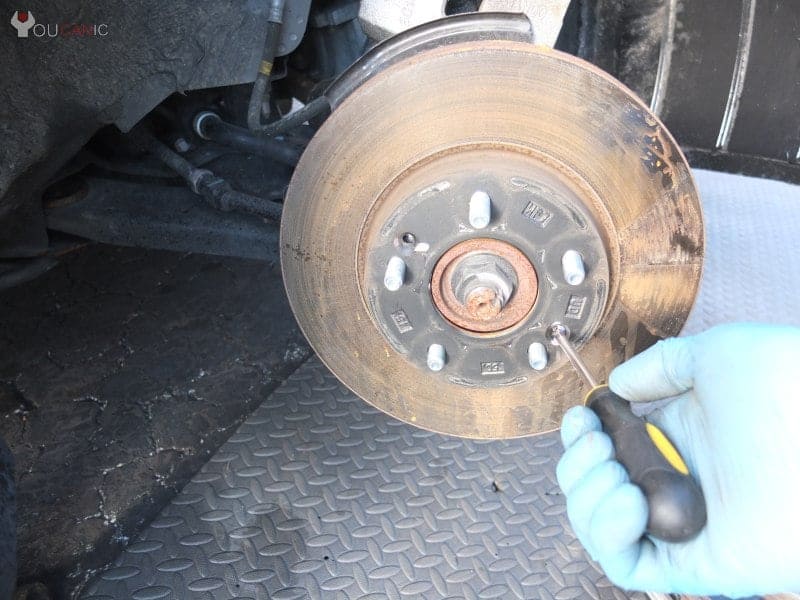
11. We recommend cleaning the bracket with a steel wire brush before installing the new pads. Compare the old and the new rotors to ensure they are the same size.
12. Install the new rotor. Carefully fit the new rotor. If you install new slotted rotors, ensure they are fitted correctly to spin in the proper direction. Tighten the rotor retaining bolts.

13. Next, install the bracket and tighten the two bolts on the back. Remember, the bolts on the back of the brake pad bracket must be tight. If you use a torque wrench, torque them at 70 ft-lbs.
14. Clean. Using a dry towel or a rag, you can clean the dirt from the calipers and the pistons with a special spray for cleaning brake parts.
15. Install the new brake pads. The new brake pads will probably be thicker than the older ones; you must use an even surface (e.g., the old brake pad) to press back the caliper pistons to fit the new brake pads inside the brake calipers.

16. A C-clamp can be used to compress the pistons backward. Don’t push the pistons too far until the pistons are in line with the rubber dust boot. Put the new brake pads in their place; make sure they are tight and well-fitted.
17. Reinstall the brake caliper. Ensure the dust boot clears the brake pads to avoid tearing. Tighten the two caliper bolts to the specified torque below.

18. Refit the front wheel. Tighten the lug nuts in a criss-cross pattern. Lower the vehicle until it puts weight onto the wheel to prevent it from spinning, then complete tightening the lug nuts to specification.
Torque Specifications
- 14 mm caliper guide bolts: 20 lb-ft.
- Brake Caliper Retainer / Bracket: 70 lb-ft
- Lug nuts: use the value in your owner’s manual, as it varies by model
Before you drive away
Pump the brake pedal several times with the car stationary until it feels firm. The caliper pistons were pushed back to fit the thicker new pads, and the first pedal press only brings the pads into contact with the rotors. Drive off without doing this and the first time you need to stop there will be almost no braking at all. It is the single most dangerous omission in this job and it takes five seconds.
Check the brake fluid level once everything is back together. Pushing the pistons back forces fluid up into the reservoir, so if someone had topped it to maximum on worn pads it may have overflowed, and brake fluid strips paint within minutes. Flush any spill with plenty of water rather than wiping it.
Bed the new pads in
New pads and rotors need a bedding procedure to transfer an even layer of friction material onto the disc surface. The usual method is a series of moderate stops from around 35 miles per hour, allowing the brakes to cool between them, avoiding both hard emergency stops and sitting stationary with your foot on the pedal while they are hot.
That last point is where most people go wrong. Holding hot new pads against a hot new rotor at a traffic light deposits material unevenly in one spot, and that deposit is what you feel later as a pulsing through the pedal. Almost every complaint of warped rotors on a recent brake job is uneven deposits rather than actual warping, and bedding them in properly prevents it.
Expect some noise for the first few hundred miles. A light squeal from new pads while they bed in is normal; a continuous grinding is not, and means something is wrong.
Things worth doing while it is apart
Clean and regrease the caliper slide pins with proper high temperature brake grease, never ordinary grease, which melts and washes out. Seized slide pins are the most common reason one pad wears out long before the other and the main cause of premature rotor wear, and the fix costs almost nothing while the caliper is already off.
Replace pads and rotors in axle sets rather than one side at a time, so braking stays even. Fit the anti rattle shims and clips that come with the pads rather than reusing the old ones, since they are the main defense against brake squeal. And torque the wheel nuts to the figures listed above with a torque wrench in a criss cross pattern rather than running them up with an impact gun, because over tightened wheel nuts distort the rotor and produce exactly the vibration under braking that gets blamed on cheap parts.
Finally, if a brake warning light was on before you started and is still on afterwards, read the codes rather than assuming it will clear. A full system scanner will show whether the fault is a pad wear sensor, the brake fluid level sensor or something in the ABS system that a pad change was never going to address.
Frequently Asked Questions
How do I know my Hyundai front brake pads are worn?
A squeal or grinding noise, longer stopping distances or a lower brake pedal are common signs. Check pad thickness through the wheel spokes.
Should I replace the rotors with the pads?
If the rotors are grooved, warped or below the minimum thickness stamped on them, yes. New pads on worn rotors wear fast and can vibrate.
Why is my brake pedal soft after a pad change?
Pump the pedal several times before driving to move the pistons out. If it stays soft, there may be air in the system or a leak.
More guides: browse all of our Hyundai repair and troubleshooting guides.


85 ft/lbs on the lug nuts.
Instructions for well done. The only thing is the caliper guide pins are 14 mm, not 17 mm. The only other thing is it would have been nice to provide the torque spec for the lug nuts when finishing up. Thank you!