
Jaguar Check & Add Engine Coolant
Reviewed/Verified by:

Is your Jaguar XF overheating, or the engine coolant light on your dashboard is on? Learn how to fix the problem by adding engine coolant(antifreeze) to your Jaguar XF.
At a Glance
- Check only with the engine cool; never open a hot cap.
- The level should sit between the MIN and MAX marks on the reservoir.
- Top up with the coolant listed in the owner’s manual, pre mixed 50/50 or diluted with distilled water.
- Overheating or a coolant warning while driving: stop and let the engine cool.
- Needing to top up repeatedly means a leak; find it.
The cooling system is closed; therefore, if you lose coolant, you must get the vehicle serviced. A bad head gasket, coolant leak, or damaged hose or radiator can cause the engine to overheat.
How to Add/Check Engine Coolant on a Jaguar

What you will need
- Jaguar Engine Coolant 50/50
Procedure
Do not remove the coolant reservoir cap when the engine is running or hot.

🔧 Find out what is actually wrong before you pay someone to guess
Dealer level diagnostics at home with the YOUCANIC UCAN-II Pro.
- ✔ Covers most makes and models, including many luxury brands. Send us your VIN and we will confirm your car before you order
- ✔ Reads every module, not just the engine, so you find the faults a basic reader says are not there
- ✔ Commands the car: test a fan or pump, bleed ABS, retract an electronic parking brake, register a battery
- ✔ No subscriptions. Free lifetime updates, so the price you pay is the whole price
- ✔ Backed by real mechanics in the USA you can email before and after you buy
Featured in The Wall Street Journal
Allow the Jaguar XF (X260) to cool down for at least thirty minutes. Opening the radiator or coolant reservoir cap when the Jaguar engine is hot can cause serious injuries. 
Pull the hood release under the dashboard to open the hood.
Locate the coolant reservoir and remove the cap by turning it counterclockwise.
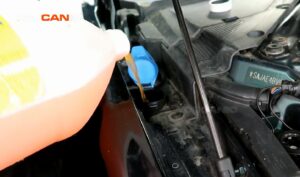
Add engine coolant to bring the level between the minimum and Maximum marks.
Do not add coolant further than the MAX mark.
Check these troubleshooting and repair guides for more help on your Jaguar XF.