
BMW Brake Light Switch Replacement Guide
Reviewed/Verified by:

This guide provides instructions on changing the brake light switch on a BMW.
At a Glance
- Symptoms: stuck in Park, no start, DSC or ABS light, cruise control off, brake lights stuck on or dead.
- Working brake lights don’t rule out the switch; it has a second circuit for the computers.
- Location: above the brake pedal behind the lower dash panel.
- Press the pedal and release the tabs (and collar, if fitted) to remove it.
- Clear the codes and confirm the brake lights work after fitting.
- A scanner such as the YOUCANIC UCAN-II Pro reads BMW DSC and engine codes and shows live brake switch status, so you can confirm the switch before and after replacing it on supported models.
If your BMW doesn’t start or leave Park, the culprit could be a bad brake light switch. You may think that the brake light is working properly because the brake lights work, but that’s not always true. Checking the brake lights can be misleading. The switch has two separate circuits: one for the brake lights and one that tells the engine and transmission computers you are braking. The second circuit can fail while the lights still work.
Symptoms
A failed brake light switch on a BMW can trigger several warning lights and errors and even prevent the transmission from shifting gears. Common symptoms of a faulty brake light switch on a BMW include:

🔧 Find out what is actually wrong before you pay someone to guess
Dealer level diagnostics at home with the YOUCANIC UCAN-II Pro.
- ✔ Covers most makes and models, including many luxury brands. Send us your VIN and we will confirm your car before you order
- ✔ Reads every module, not just the engine, so you find the faults a basic reader says are not there
- ✔ Commands the car: test a fan or pump, bleed ABS, retract an electronic parking brake, register a battery
- ✔ No subscriptions. Free lifetime updates, so the price you pay is the whole price
- ✔ Backed by real mechanics in the USA you can email before and after you buy
Featured in The Wall Street Journal
- The brake light stays on
- Shifter won’t move out of Park position
- The brake lights don’t work.
- Transmission stuck in limp, safe home mode
- DSC light comes on
- The car may not turn on
- Cruise control doesn’t work
- ABS light stays on
What you will need
- BMW Brake Light Switch
- Screwdriver
Procedure
- Park the BMW on level ground.
- Set the parking brake and turn off the ignition.

- Access the panel under the dashboard on the driver’s side. This is the black panel above the brake and gas pedals, also known as the kick panel.

- Remove the Philips screws. In some BMWs, you may have Torx screws.


Locate the brake light switch above the brake pedal. Press the connector and unplug the BMW brake light switch wire harness. Remove the brake light switch from the bracket. Start by pressing the brake pedal. There will be one or two tabs that you need to press, which will release the brake light switch. If your brake light switch has a red or white collar, you will need to slide that out, then press the tabs and release the brake light switch. Install the new switch the same way, following any adjustment instructions supplied with it, and plug the connector back in. With the ignition on, have someone confirm the brake lights come on as soon as you touch the pedal and go off when you release it.
Notes
- It is recommended to disconnect the battery negative terminal as well. Just in case there is a short while you work under the dash.
Related Errors
- The brake light fails error message.
- Brake light circuit error message
- Brake light on
- ABS or DSC light on
Conclusion
You must scan your BMW for codes if you still get an error message or your brake lights don’t work.
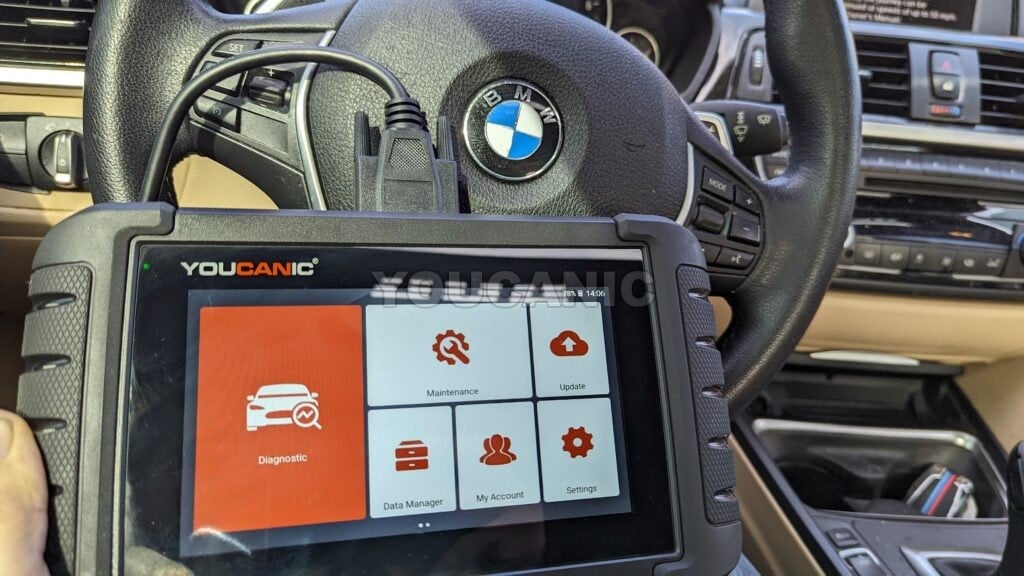
Most generic OBD2 scanners cannot read fault codes from the BMW brake system, but you can use a multi-system scanner such as the YOUCANIC UCAN-II Pro that can read fault codes in the brake and stability control modules on supported BMW models.
If your BMW brake lights don’t work, or you get a Brake Light Circuit Failure warning, brake lights are always on; the shifter won’t move out of Park, chances are that you have a bad brake light switch.
Frequently Asked Questions
What are the symptoms of a bad BMW brake light switch?
Common signs include the car being stuck in Park, a no start, DSC or ABS warning lights, cruise control not working, and brake lights that stay on or do not work.
Can the brake light switch be bad if my brake lights work?
Yes. The switch has a second circuit that reports brake pedal position to the computers, and that circuit can fail while the lights still work.
Where is the brake light switch on a BMW?
It is mounted above the brake pedal behind the lower dash panel.
Do I need to clear codes after replacing the switch?
Yes. Clear any stored DSC and engine codes and confirm the brake lights work before driving.
Check these troubleshooting and repair guides for more help on your BMW.
Related Guides
- BMW 5 Series E60 Change Rear Brake Turn Signal Light Bulb
- Reset BMW Brake Light Service Reminder
- How to Reset the BMW Brake Fluid Service Warning Light
- Troubleshooting BMW Stability Control Warning Light