
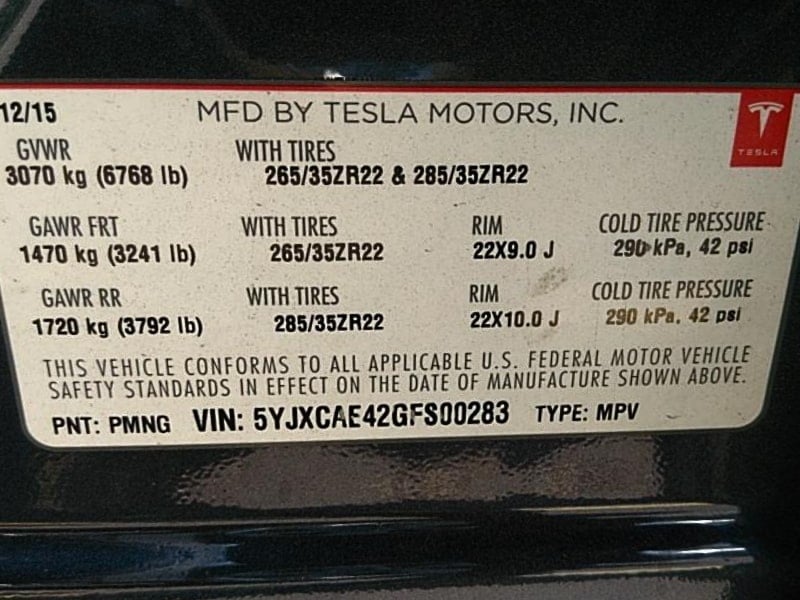
Tesla VIN Number Location
Reviewed/Verified by:

Tesla VIN is located in the lower-left corner of the windshield, with a sticker on the driver’s door frame, vehicle registration, or user’s Tesla account, which can be accessed online or via the app.
At a Glance
- Quickest spot: Lower left corner of the windshield, viewed from outside
- On the car: Driver’s door pillar label; also on the touchscreen under Controls, then Software
- Online: Tesla app and your Tesla account
- Paperwork: Registration and insurance policy
- Format: 17 characters, never using I, O or Q


You can find your Tesla VIN (vehicle identification number) in any of the following locations:

- The lower left corner of the windshield.
- Driver’s door frame. Open the driver’s door and look at the center (B) pillar.
- The label on the rear hatch.
- It is printed on the firewall.
- Touchscreen: tap Controls, then Software, to see the VIN.
- Your Tesla account on the Tesla website
- Tesla App: open the Tesla phone app and scroll to the bottom of the page there you will see the VIN.
- Vehicle registration
- Insurance Policy
Do Tesla cars have a VIN?

Yes. All Tesla vehicles have a VIN.

🔧 Find out what is actually wrong before you pay someone to guess
Dealer level diagnostics at home with the YOUCANIC UCAN-II Pro.
- ✔ Covers most makes and models, including many luxury brands. Send us your VIN and we will confirm your car before you order
- ✔ Reads every module, not just the engine, so you find the faults a basic reader says are not there
- ✔ Commands the car: test a fan or pump, bleed ABS, retract an electronic parking brake, register a battery
- ✔ No subscriptions. Free lifetime updates, so the price you pay is the whole price
- ✔ Backed by real mechanics in the USA you can email before and after you buy
Featured in The Wall Street Journal
Tesla Hidden VIN
If you have a new Tesla order, there are ways to find your unique Tesla VIN before you even get the delivery of the vehicle.
Login to your Tesla account. Right-click on the page and click on View Source Code.
Then, search for 5yj on the source code. If this is too complicated, there is an easier way.
Browser extensions that claim to surface the VIN automatically do exist, but think before installing one. To work, it has to read the contents of your logged in Tesla account page, which means trusting whoever maintains it with access to your order and account details. The view source method above gives you the same information, takes a minute and gives nothing away.
Tesla VIN Decoder
You can use this VIN Decoder tool to decode a Tesla VIN. For reference, here is some information on how to decode a Tesla VIN yourself.
- Positions 1-3 are the World manufacturer identifier,
- 5YJ: USA
- Position 4: Tesla model.
- Position 5: Body type.
- Position 6: Airbags and restraint system.
- Position 7: battery type
- Position 8: Motor/Drive.
- Position 9: Varies
- Position 10: Model year
- Position 11: Plant
- F for Fremont.
- Positions 12 to 17 are sequence numbers.
Why the VIN appears before delivery
Tesla assigns a VIN once a specific car has been matched to your order, which is usually the clearest sign that the build is real and a delivery window is close. It can change if the car is reassigned, so the number showing today is not guaranteed to be the one you collect. Treat an early VIN as progress rather than a commitment, and confirm it against the car at handover.
Check the VIN on the car at delivery
When you take the car, match the number on the windshield plate against the one in the paperwork and in the Tesla app before signing anything. It takes seconds and it is the only point at which a mismatch is easy to resolve. The same check matters even more when buying used, where the windshield plate, the door pillar label and the title should all agree.
What the VIN tells you about the car
Tesla VINs encode the model, body, restraint system, motor and drive configuration, plant and model year. That makes them useful for confirming that a used listing really is the variant it claims to be, since trim names and badges can be swapped but the VIN cannot. It is also what parts suppliers and service centers need to identify the exact build.
A decode is not a history check
Decoding tells you how the car was built, not what has happened since. For a used Tesla, check the service history in the app or with Tesla directly, and run a separate history report for accident and title records. Battery and drive unit warranty cover transfers with the car and is tied to the VIN, so it is worth confirming what remains before agreeing a price.
Frequently Asked Questions
Where is the VIN on a Tesla?
The quickest place is the lower left corner of the windshield. It is also on the driver’s door pillar label and in the Tesla app.
How do I find my Tesla VIN on the touchscreen?
Tap Controls, then Software. The VIN is listed on that screen.
Can I see my Tesla VIN before delivery?
Often, yes. The VIN usually appears in your Tesla account once a car has been matched to your order.
Does a VIN decode tell me the car’s history?
No. A decode shows how the car was built. Use a history report to check for accidents, title problems and prior owners.
Related guides: Tesla VIN Decoder · YOUCANIC VIN Decoder


