Scanner Guide: How to Register and Update Your YOUCANIC Scanner for the First Time
Welcome to the YOUCANIC family! Thank you for choosing our scanner, and we hope it helps you go far on your DIY journey.
This article will walk you through how to register and update your scanner for the first time, but if you are more of a visual learner, feel free to follow our video tutorial below!

NOTE: The scanner used in this guide is YOUCANIC’s latest UCAN-II-C model. However, these steps will work for other YOUCANIC scanner models.

🔧 Stop paying the dealer for every warning light
Get dealer level diagnostics at home with the YOUCANIC Full System Scanner.
- ✔ Works with all makes and models, including most luxury brands
- ✔ Topology map view shows all vehicle modules on one screen for faster diagnostics
- ✔ Bi directional controls to test fans, pumps, actuators and more so you do not have to guess
- ✔ Special resets and calibrations such as ABS bleed, EPB service, battery registration and more
- ✔ Free lifetime updates with no recurring fees
Why register your scanner?
While you don’t need to register your scanner to use any of the diagnostic tools, registering your scanner will allow you to run software updates and let our software development team better diagnose issues with your scanner when they arise.
Step-By-Step Guide
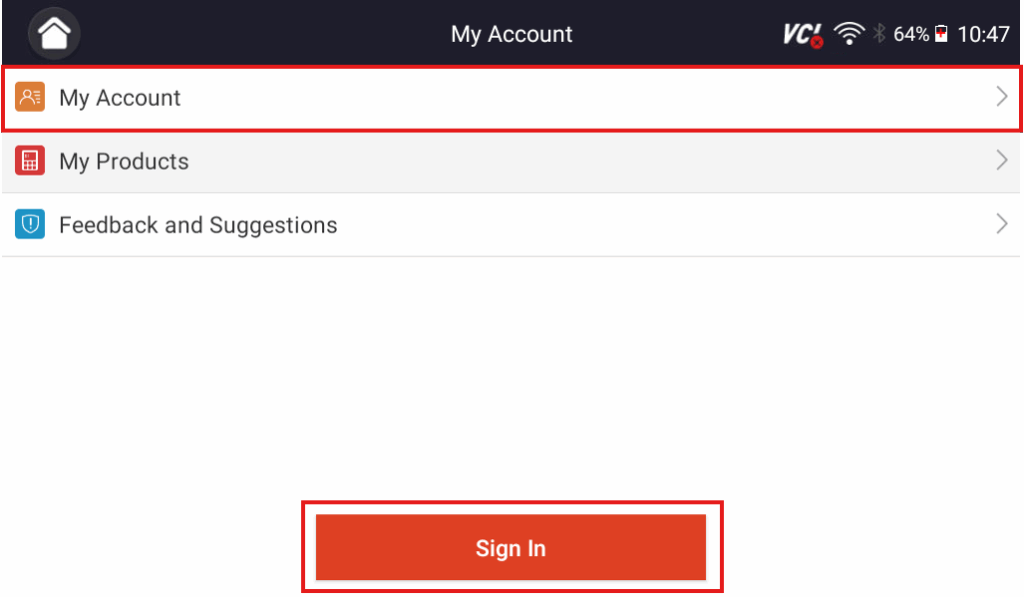
1. From the home screen, either open the Updates tab or select “My Account” on the homepage. Both lead to the same sign-in screen if the scanner has not already been registered.
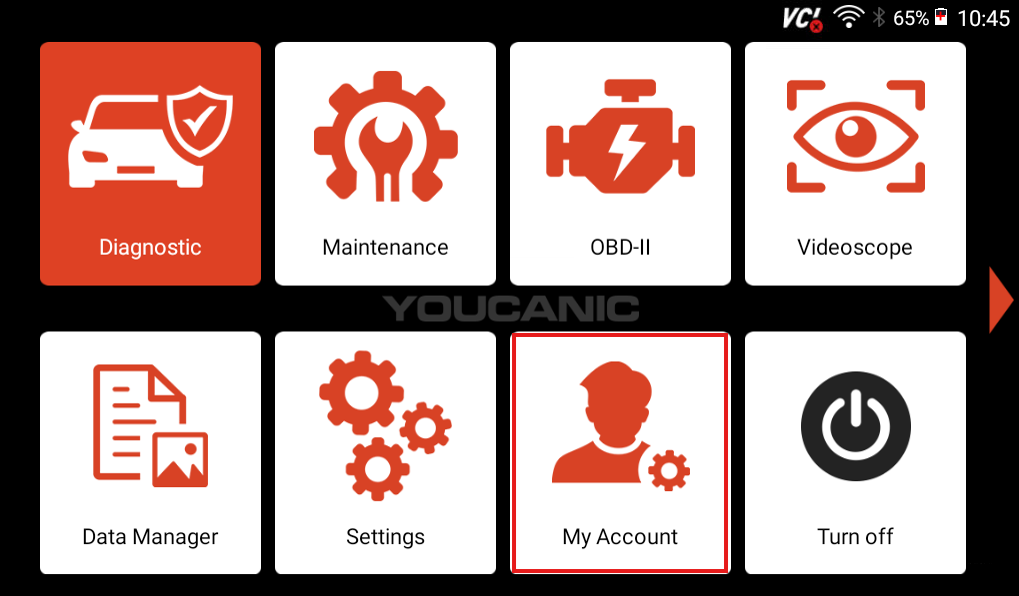
2. Select “Sign In” or “My Account” and choose “Free Registration” on the following screen to create a new account.
3. Enter your email address in the email field. (Use an email you can access easily because the scanner will send you a verification code.)
4. Tap the “Send Code” button and then open your email inbox to retrieve the verification code.
5. Enter the verification code into the verification code line on the scanner.
6. Create a secure password and enter it in the password field.
7. Agree to YOUCANIC’s Conditions and tap the “submit”Free Registration” button to complete registration.

8. After pressing the “Free Registration” button, press the “Submit” button on the following screen. This will register the serial number printed on the back of your scanner to the email you used to create your account.

9. Once registration finishes, go ahead and run software updates from the Updates tab.

Troubleshooting
Are you having trouble setting up your scanner? Here are some common problems you might encounter during registration and updates, along with how to resolve them.
No verification email received
- Check your spam/junk folders and any alternative inboxes (Promotions, Updates, etc.).
- Confirm you typed the email address correctly during registration.
- If needed, retry sending the code from the registration screen.
Scanner won’t restart after updates
- Manually restart by holding the power button until the restart option appears and select Restart.
- If the scanner remains unresponsive after a restart attempt, contact support for guidance.
Updates take a very long time or get stuck
- First-time update sequences may take longer than expected to complete as multiple updates are applied.
- Ensure the scanner has a stable internet connection during updates.
- If the process seems truly stuck for an extended period (e.g., over an hour with no progress), contact support for further instructions, or restart your scanner and try again.
When to contact support
If you run into any issues you can’t resolve, our support team is always available to help. Email us at support@youcanic.com with a description of the problem and the scanner’s serial number (found on the back of the unit). The serial number registered to your email makes it easier for our software development team to look into any issues you might be experiencing.