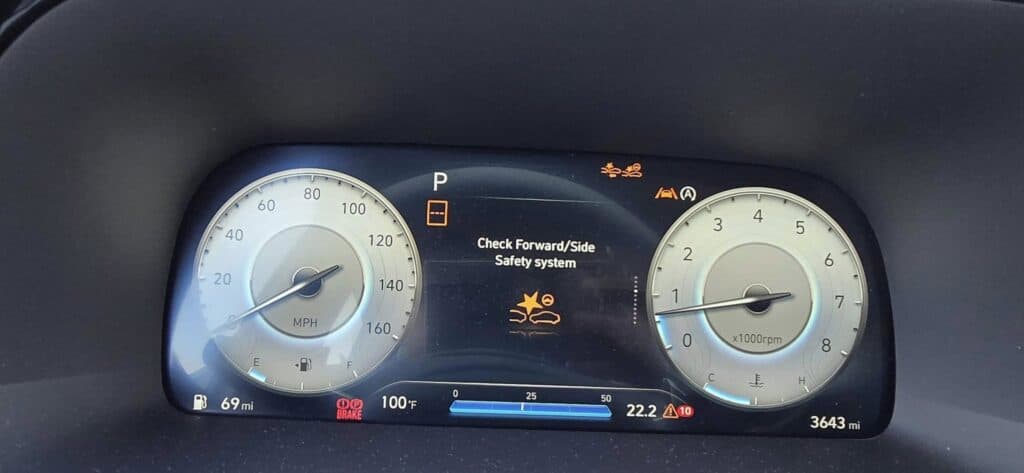
When the “Check Forward/Side Safety System” Warning comes on in the dashboard of your Hyundai, it means there is an issue with the Forward Collision-Avoidance Assist (FCA) system. Ignoring this warning can compromise vehicle safety, potentially leading to serious accidents during turns, evasive lane changes, and automatic emergency braking.
What is the Forward/Side Safety System?
The Forward/Side Safety System is part of your vehicle’s Forward Collision-Avoidance Assist System (FCA). This safety feature alerts you to a possible collision and helps control your vehicle, preventing forward or side collisions. When this light turns on, your FCA system is not working correctly, increasing the risk of an accident.
⚠️ Why You Should Fix It as Soon as Possible:
Safety Risk – The FCA is a safety feature in your vehicle that helps prevent collisions in dangerous driving conditions. The Front/Side Safety System supports and improves the FCA, especially with incoming vehicles and vehicles next to you. FCA uses the Forward/Side Safety System to assist with steering when changing lanes, helping to prevent collisions with nearby cars. It also assists when passing another vehicle on a two-lane road if there is a risk of hitting an oncoming vehicle. If the FCA or Front/Side Safety System fails, the risk of accidents increases, as steering assist and emergency braking may not work.
Performance Issues – You might experience your car decelerating on the highway due to inaccurate data readings or your sensors misinterpreting the presence of a vehicle ahead.
Costly Repairs if Ignored – The cost to realign and recalibrate sensors is around $350 to $800, and the total replacement of components and sensors starts at $1,000, depending on where you live.
Common Causes of Forward/Side Safety Systems
Here are the most common reasons why Check Forward/Side Safety System light appears:
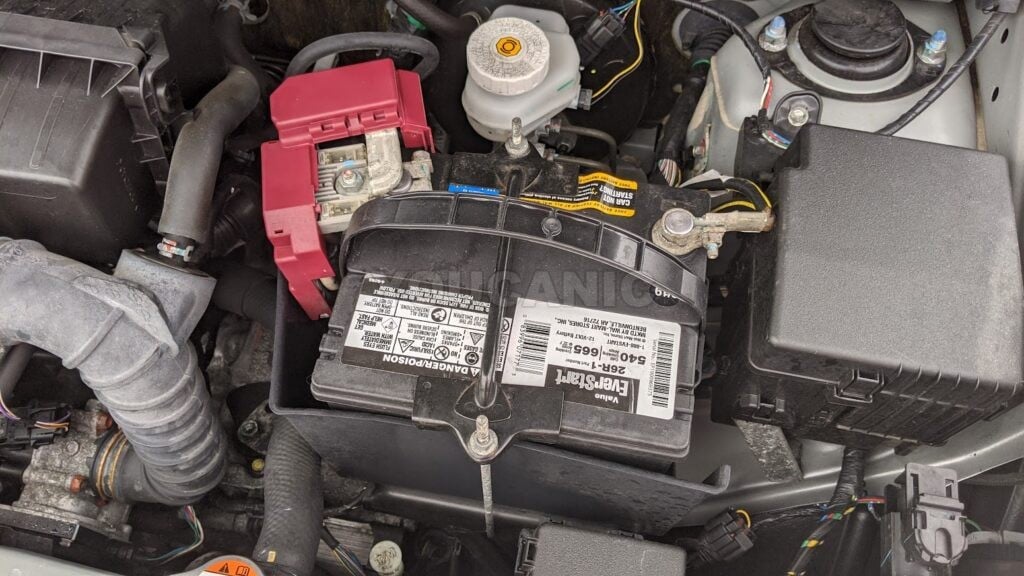
⚠️ Weak Battery: A dead or dying battery can cause erroneous system errors and unexpected warning lights because it cannot supply enough energy to necessary electrical components.
⚠️ Faulty Sensor: The FCA and Forward/Side Safety System rely on the vehicle’s front-view camera and front and rear radar sensors. These sensors can become obstructed by dirt, become misaligned, and require recalibration, leading to these sensors misinterpreting data. The mountings on these sensors can bend due to bumps, previous crashes, or other incidents that may cause the sensors to become misaligned or damaged. Other safety warning messages may also appear, such as Check Lane Change Assist Function, Check Lane Safety System, Check Speed Limit System, or Check Smart Cruise Control System.
⚠️ Loose or Corroded Wires: Damaged wires and faulty connections can cause intermittent and electrical disruptions.
⚠️ Software glitch: A software glitch, such as a bug, outdated firmware, or corruption during an update, can cause miscommunication between components, resulting in a false warning.
⚠️ Low Fluid Levels: Sometimes, this warning will turn on alongside the “Check Brake Fluid” message if the brake fluid level is way below the “MIN” line. The system relies on controlled braking operations, such as the Emergency Braking function during close-call situations. If the brake fluid is below the low level, a warning message will appear on your dashboard.
⚠️ Malfunctioning Module: A bad electronic control unit (ECU)or anti-lock braking system (ABS) control module could trigger false alerts.
⚠️ Defective Wheel Speed Sensor: The ESC and ABS help control the vehicle during potential collisions. The wheel speed sensors send real-time data to ABS and ESC systems, which help determine vehicle movement, traction, and stability. A warning message will appear on your dashboard if these sensors break or become dirty.
⚠️ Electronic Power Steering (EPS) Malfunction: If the EPS is experiencing issues such as a faulty steering angle sensor, communication failure with the ECU, or power steering loss, it may interfere with steering during evasive maneuvers. This can cause the vehicle to disable forward safety systems, resulting in a warning message.
⚠️ Driving in wet conditions: Heavy rain, water splashes, or mist can obstruct the front and rear radar sensors, leading to inaccurate readings or temporary system malfunctions.
🛠️ Pro Tip: Use an OBD-II scannerto check for error codes related to the issue.
Troubleshooting
Before taking your car to a mechanic, try these DIY fixes:
Check Battery Health – Use a multimeter tool or battery tester to check that the voltage is 12.4V. A battery tester can check the State Of Charge (SOC) and State Of Health (SOH), which will help you better diagnose what is wrong with the battery. (e.g., defective battery, charge the battery or good battery messages will appear on the screen.)
Inspect Wiring & Connections – Look for loose or frayed wires around the front-view camera, front radar sensors, and rear radar sensors.
Inspect Fuses– look for damaged or melted fuses and relays in your vehicle’s fuse box. This could be an indicator of an electrical issue in your car. ONLY REPLACE OLD FUSES WITH NEW ONES OF THE SAME AMPERAGE.
Inspect sensors for dirt and damage – Sensors can become damaged or dirty over time. Inspect the sensors (front radar sensors, rear radar sensors, wheel speed sensors) around your vehicle for dirt, water damage, or loose wires, as these may be causing the issue. Check your windshield for any dirt or debris that may be blocking the view of your front camera.
Top-Off Fluids – Check if the brake fluid and power steering fluids are at a safe level (near the “MAX” line.”) Top them off with the recommended fluids. ONLY USE THE RECOMMENDED BRAKE AND POWER STEERING FLUID IN YOUR USER MANUAL.
Reset the system by disconnecting the battery for 30 minutes or using a scan tool to clear the warning light or error message caused by a glitch.
Use an OBD-II Scanner– Read and clear error codes to see if the issue is temporary. Use a high-quality OBD2 scanner, as cheaper ones may not access system faults related to ADAS, EPS, ABS, and other modules.
Common OBD-II Fault Codes for Check Forward/Side Safety System
If you scan your vehicle with an OBD-II scan tool, you may see one of these codes:
Can I still drive with the Check Forward/Side Safety System on?
➡️You can drive with the warning message on, but drive carefully until it is fixed. If the car runs normally and the warning goes away after cleaning the sensors or restarting, it might have just been a glitch. If the warning stays on, especially with other alerts like ABS or EPS warning lights, or if you notice issues like stiff steering or unexpected braking, get it fixed immediately.
How do I reset the Check Forward/Side Safety System?
➡️ To reset the warning message, try restarting the car, cleaning obstructions in the front camera and radar sensors, or driving a few miles to see if it clears. If that doesn’t work, disconnect the negative terminal of your battery for about 30 minutes. You can also use an OBD-II scanner to check and clear fault codes.
What happens if I ignore this warning message?
➡️ The risk of accidents increases. Your car’s safety features, like the Forward Collision-Avoidance Assist, automatic emergency braking, and steering assist, may not function properly in the event of an accident. If the problem is connected to ABS or ESC, you will only know if you look for DTCs with a scanner or take your car to a trusted mechanic to professionally service it. There is a higher risk of skidding and losing control during abrupt braking.
Do I need a mechanic, or can I fix this myself?
➡️ You can follow the easy troubleshooting procedures in this article. Start troubleshooting by restarting the car, cleaning any sensor obstructions, checking brake fluid, inspecting wheel speed sensors for dirt or damage, and disconnecting the battery for 30 minutes. If you have an OBD-II scanner, check for fault codes and clear them if no major issues are found. You can also run a real-time data check on the wheel speed sensors using a high-quality scanner like the Youcancic Scanner. If the warning remains after these steps, take your vehicle to a trusted mechanic or dealer.
Final Thoughts
Addressing the Hyundai Check Forward/Side Safety System warning promptly is essential, as it may indicate a malfunction within critical safety components such as your vehicle’s collision avoidance or lane-keeping systems. Ignoring this alert can compromise your safety and the vehicle’s overall performance. By performing thorough diagnostics, including scanning for fault codes and following recommended troubleshooting procedures, you can identify and resolve issues early—helping to prevent costly repairs and maintaining the integrity of your vehicle’s advanced driver-assistance systems. When in doubt, consulting a qualified professional ensures your vehicle continues to operate safely and reliably.
Experts Who Contributed to This Article
Antonie Labasan
Diagnostic Specialist
Antonie Labasan is a Registered Mechanical Engineer and Lean Six Sigma Blackbelt who brings practical automotive expertise to our diagnostic guides. With specialized training at VOLVO and years of experience managing diverse vehicle fleets including Toyota, Hyundai, and Kia models, Antonie understands common failure points across different manufacturers. His systematic approach to diagnostics helps readers identify and fix the true source of automotive problems, making his YOUCANIC scanner guides exceptionally effective for DIY mechanics.
rhila, ASE Certified
Diagnostic Specialist15+ years of experience
Rushit Hila is a dedicated automotive engineer with ASE G1 certification and specialized training from an esteemed Automotive Specialty School. His hands-on experience and technical expertise in advanced diagnostics, system integration, and performance optimization make him a trusted voice in the industry.
Searching...
33% OFFFlash Sale — Ends Soon
⭐⭐⭐⭐⭐ 4.8 stars · 247 Verified Reviews
Stop paying $150 every time a warning light comes on.
The UCAN-II-D gives you full system diagnostics, bidirectional controls, and lifetime free updates. One scanner. Own it forever.
Was
$750
→
Now
$499
Save $251
+ Free shipping · No subscription ever
Free lifetime updates included — no annual fees ever