How to Read and Clear Land Rover Fault Codes View Live Data
For the passionate do-it-yourself Land Rover enthusiast, there’s nothing quite like the thrill of tackling off-road adventures and conquering rugged terrain. However, these remarkable vehicles can occasionally throw a curveball in the form of warning lights on the dashboard. Whether you’re behind the wheel of a Land Rover Discovery, Range Rover, Defender, or other models, those illuminated icons can cause concern.

In this article, we’re diving headfirst into the fascinating world of Land Rover fault codes. This knowledge will empower you to confidently read, clear, and access live data from crucial control units like the Engine Control Module (ECM), Transmission Control Module (TCM), and more. With this arsenal of skills, you can take control of those mysterious dashboard warnings, regardless of which Land Rover model you own, and transform them into mere pit stops on your exhilarating journey.

🔧 Stop paying the dealer for every warning light
Get dealer level diagnostics at home with the YOUCANIC Full System Scanner.
- ✔ Works with all makes and models, including most luxury brands
- ✔ Topology map view shows all vehicle modules on one screen for faster diagnostics
- ✔ Bi directional controls to test fans, pumps, actuators and more so you do not have to guess
- ✔ Special resets and calibrations such as ABS bleed, EPB service, battery registration and more
- ✔ Free lifetime updates with no recurring fees
Process of reading and clearing fault codes
OBD stands for “On-Board Diagnostic”. Most modern vehicles now include an OBD port, which can be utilized by a scanner that communicates to your vehicle. It is plugged in by an OBD-II scanner into the socket designed to help automotive technicians interpret faults and other issues that your Land Rover may be experiencing or have recorded. All Land Rovers have an OBD-II port; some common models include Defender, Range Rover, Range Rover Sport, Range Rover Velar, Discovery Sport, Evoque, and many more. Click here to learn about your Land Rover’s dashboard lights. Moving on, here are the steps on how to read DTCs or Fault codes:
- Gather the necessary tools: Equip yourself with a Professional-Grade OBD-II Scanner compatible with your Land Rover. Click Here for our Professional-Grade YOUCANIC Scanner

- Access the OBD-II Port: This port is usually found near the steering column under the dashboard. The OBD-II port is the gateway to your car’s diagnostic information. Turn the ignition key to the “ON” position without starting the engine to make a connection with the vehicle’s computer. If your Land Rover has a START/STOP feature, press the button without pressing the brake pedal. Do not start the engine. If you are unsure of the OBD-II port of your vehicle, you can always check the Car Owner’s Manual.

- Turn on the ignition.

- Access the Diagnostic Menu: On the YOUCANIC scanner’s display, navigate to the “Diagnostic” or “Scan” menu. This menu allows you to access various diagnostic functions for your Land Rover.

- Select ‘LandRover’ as the Vehicle Make: This ensures the scanner effectively communicates with the Land Rover’s On-Board Diagnostic system and effectively scans the fault codes.
- Select option for model selection: The scanner has various options; you can choose SmartVIN to detect your vehicle automatically. However, you choose Manual Selection if SmartVIN does not work as intended. To learn more about your vehicle’s VIN, check out our article here.
- Select the Specific Model and Chassis: After selecting the vehicle make, scroll through the available models and select the correct one for your Land Rover. Choose the corresponding chassis or body type to properly sync the scanner to your vehicle.
- Select Control Units: Once you have selected the model and chassis, the scanner will let you choose between “Quick scan” or “Control Modules.” Control Modules display a list of control units or modules in your vehicle. Examples include the engine control module (ECM), transmission control module (TCM), and ABS control module. Choose the specific module you want to diagnose. Otherwise, you can also choose the “Quick Scan” to check everything.
- Interpret the Codes: Once the YOUCANIC scanner completes the code retrieval process, the displayed codes will provide information about specific issues detected by the control unit. Take note of these codes for further analysis and diagnosis. Each DTC consists of a letter and four numbers. The letter indicates the system affected, while the numbers describe the issue more specifically. Click here to learn more about fault codes.
- Erase Codes: After the problem has been repaired, return to the scanner’s menu and select the option to “Erase Codes” or “Clear Codes.” This action removes the stored fault codes from the control unit’s memory, indicating that the problem has been resolved. Please note that you may or may not erase a code when the issue is not fixed.


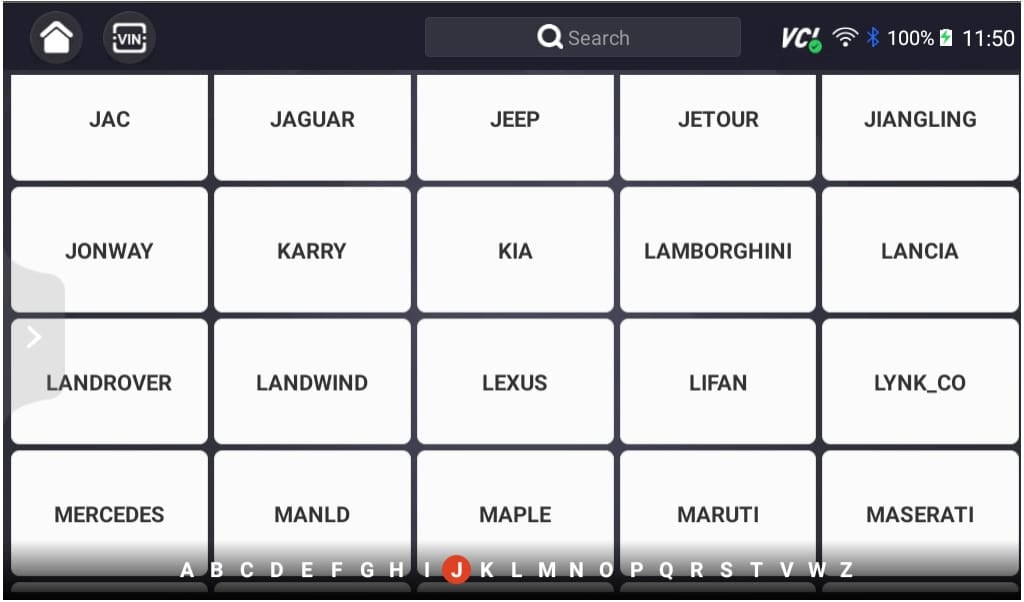
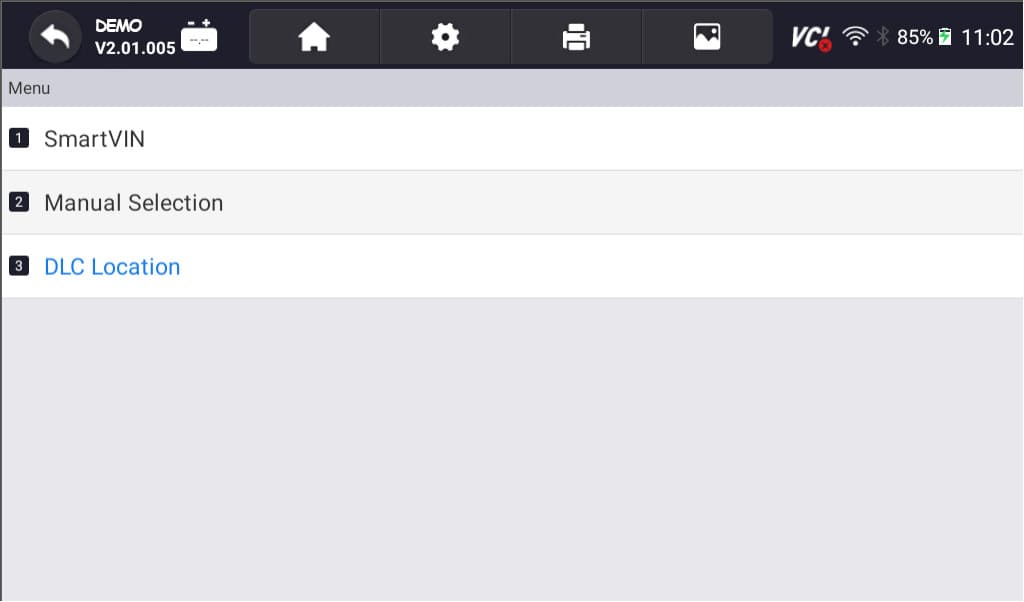


NOTE: These pictures are just the demo of our YOUCANIC Scanner. It may or may not be the same
Common Land Rover Fault Codes
Here are some of the most common Land Rover fault codes and possible causes:
- P0300 – Random/Multiple Cylinder Misfire Detected: Multiple cylinders are experiencing misfires, often due to ignition or fuel system issues.
- P0171 – System Too Lean (Bank 1): The air-fuel mixture is too lean on one side of the engine, potentially caused by vacuum leaks or a faulty oxygen sensor.
- P0174 – System Too Lean (Bank 2): Similar to P0171, but affecting the opposite side of the engine.
- P0420 – Catalyst System Efficiency Below Threshold (Bank 1): The engine’s catalytic converter may not work efficiently on one side of the engine.
- P0430 – Catalyst System Efficiency Below Threshold (Bank 2): Similar to P0420, but related to the catalytic converter on the other side of the engine.
- P0400 – Exhaust Gas Recirculation (EGR) Flow Malfunction: There’s a problem with the EGR system, which can lead to increased emissions.
- P0442 – Evaporative Emission System Leak Detected (Small Leak): A small leak in the evaporative emissions system has been detected.
- P0455 – Evaporative Emission System Leak Detected (Large Leak): A significant leak in the evaporative emissions system requires attention.
- P0500 – Vehicle Speed Sensor Malfunction: The vehicle speed sensor is not working correctly, affecting the speedometer and other systems.
- P0720 – Output Speed Sensor Circuit Malfunction: The speed sensor on the transmission has an issue, potentially affecting shifting and vehicle performance.
- P1260 – Theft Detected, Vehicle Immobilized: An anti-theft system code indicating a need for key reprogramming or addressing a security issue.
- P1338 – Camshaft Position Sensor A/B Correlation: There’s a problem with the correlation between camshaft position sensors, affecting engine timing.
- U0401 – Invalid Data Received from Engine Control Module (ECM): Communication issues between control modules in the vehicle.
- U0416 – Invalid Data Received from Vehicle Dynamics Control Module: Relates to vehicle stability control system problems.
- C1121 – Right Front Wheel Speed Sensor Input Signal Missing: Indicates a missing input signal from the front right wheel speed sensor, affecting ABS and traction control.
- C1122 – Left Front Wheel Speed Sensor Input Signal Missing: Similar to C1121, but for the front left wheel speed sensor.
These explanations briefly overview what each fault code typically signifies in Land Rover vehicles.
DIY as an Enthusiast or consult a mechanic?
Whether to tackle DTCs yourself or seek professional assistance depends on your mechanical aptitude and the issue’s complexity. If you’re a seasoned DIY enthusiast with a well-stocked toolbox, you might be able to handle minor issues. However, for more intricate problems, it’s wise to entrust your Land Rover to the expertise of authorized Land Rover technicians. You can also check our article here if the check engine light stays on in your Land Rover.
Decoding the Enigma of DTCs
DTCs are standardized codes that follow a specific format, providing valuable insights into the nature of the problem. The first character indicates the type of system (P for powertrain, B for body, C for chassis, and U for network comm.), followed by four digits. The first digit identifies the system, the second digit denotes the subsystem, and the last two digits pinpoint the specific fault. 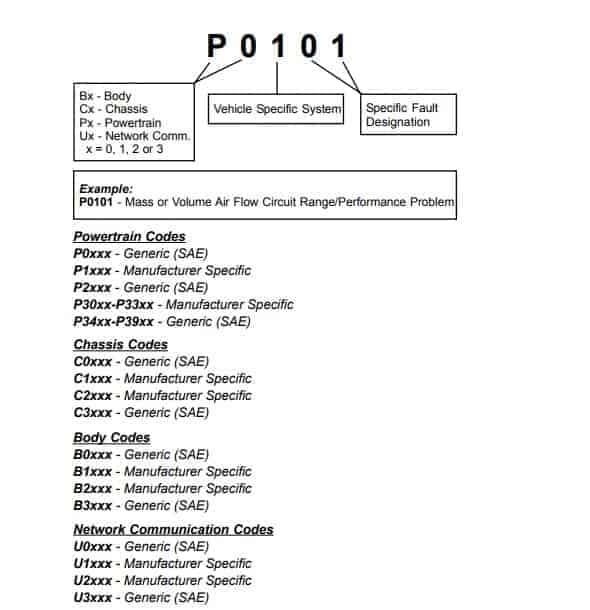
For instance, a DTC starting with P01 would indicate a powertrain issue related to fuel or air metering. Further, a code like P0171 would point to a lean air-fuel mixture.
Why Should I Scan My Vehicle?
Regular scanning offers several benefits:
- Early Detection of Issues: DTCs can alert you to potential problems before they cause noticeable symptoms, allowing for timely intervention.
- Improved Fuel Efficiency: Addressing underlying issues can enhance fuel economy, saving you money at the pump.
- Extends the Vehicle Lifespan: Promptly addressing faults can prevent further damage and prolong your Land Rover’s lifespan.
Regular scanning as a preventive checkup for your Land Rover is like visiting your doctor annually. Your Land Rover deserves regular attention to keep it running smoothly and safely.
Why can’t I clear my Land Rover’s error codes?
Once you’ve identified the DTCs, you may be tempted to clear them, hoping to continue driving your Land Rover, and the problem magically disappears. Clearing the codes can temporarily remove the “Check Engine” light, but it doesn’t address the underlying issue. It will always come back. Here are also some lists of why you cannot clear the codes of your Land Rover:
- Use a Professional-Grade Scanner: Ditch the generic scanner and upgrade to a professional-grade like YOUCANIC. Generic scanners are like trying to open a Ferrari with a Ford key – it won’t work! YOUCANIC, on the other hand, is like the master key to your Land Rover’s diagnostics, unlocking hidden diagnostic powers and letting you clear codes that would otherwise remain stubborn and hidden.
- Underlying Issues: Before clearing fault codes, remember to address the underlying issue that triggered them in the first place. Clearing codes is like patching a leaky pipe without fixing the cracked valve – it’s just a temporary fix. The ‘check engine’ light will surely come back and haunt you.
- Continuous Fault Monitoring: Connecting the battery (like a reset) may clear certain fault codes. They will reappear even after clearing until the root cause is resolved. It is a persistent reminder to fix the problem, not just mask it.
- Proper Clearing Procedure: Following the correct steps outlined in your diagnostic scanner’s user manual is essential to clear fault codes effectively. If unsure about the clearing procedure, consult a professional for guidance specific to your scanner and Land Rover model.
Check our YOUCANIC Scanner:
What Happens When I Ignore Fault Codes?
Ignoring DTCs can lead to a cascade of issues.
- Performance: Over time, unaddressed faults can lead to decreased performance, reduced fuel efficiency, and increased emissions.
- Safety Hazard: Ignored DTCs can pose safety risks, particularly related to critical systems like brakes or airbags.
- Costly Repairs: Putting off repairs can result in more extensive damage, such as damage to your transmission, leading to higher repair costs in the long run.
Frequently Asked Questions:
How often should I scan my Land Rover?
Regular scanning is advisable, especially if you notice any changes in your vehicle’s performance or behavior.
Are there any free DTC scanning tools?
Several free OBD-II scanning apps are available for smartphones. However, their capabilities are not advisable. It is always better to use professional-grade scanners.
What is the difference between a DTC and a trouble code?
DTC and trouble code are interchangeable terms. They both refer to diagnostic trouble codes used to identify and diagnose vehicle system problems.
Can I clear fault codes myself?
Yes, you can clear fault codes yourself using a compatible scan tool. However, it is important to address the underlying issue that caused the code to be set first, as clearing the codes alone may not resolve the problem.
References:
- What Is an OBD2 Scanner and How Does It Work?
What Is an OBD2 Scanner and How Does It Work? | The Drive - DTC Fault Codes
DTC Fault Codes – YOUCANIC - What Does the Check Engine Light Look Like, and What Does It Mean?
What Does the Check Engine Light Look Like, and Really Mean? – Consumer Reports - A Guide to Understanding DTC Codes
A Guide to Understanding DTC Codes (samsara.com)