Audi Distance Warning System Down? Here’s What You Need to Know and How to Fix It!
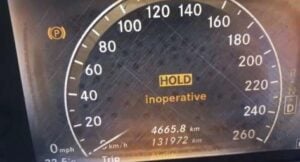
Seeing the “Distance Warning: Currently Unavailable” message pop up on your Audi’s dashboard can be disturbing, at least for car owners who want the best driving experience from their Audi. This warning usually means there are issues related to the vehicle’s distance sensors(front camera and radar sensor) or the systems they are connected to. While this warning is not the end of the world, ignoring it will lead to minor driving inconveniences, meaning you must be very careful on the road. This error should not take long to fix unless it is a job for your mechanic and should be done as soon as possible; your car’s safety and reliability are at stake.
What Does the Warning Message Mean?
The “Distance Warning” is one of Audi’s Adaptive Cruise Control system features, which measures the distance of a vehicle in front of you by showing the distance time gap between your vehicle and the vehicle in front of you. When there is a problem with the adaptive cruise control, or when you are too close to the car in front of you, a red warning light that looks like two cars bumping into each other will appear on your dashboard.
There are five different distance settings that you can set the cruise control to when driving: distance 1, which is equal to 1 second; distance 2, which is 1.3 seconds; distance 3, which is 1.8 seconds; distance 4, which is 2.4 seconds; and distance 5, which is 3.6 seconds. The distance data is retrieved from the radar sensors of your car located in your front bumper. When there is a temporary failure in the system, a warning message appears. The system may also fail to detect motorcycles, vehicles with high ground clearance, and overhanging loads, so it is important to stay alert on the road ahead of you, even when using adaptive cruise control.

🔧 Stop paying the dealer for every warning light
Get dealer level diagnostics at home with the YOUCANIC Full System Scanner.
- ✔ Works with all makes and models, including most luxury brands
- ✔ Topology map view shows all vehicle modules on one screen for faster diagnostics
- ✔ Bi directional controls to test fans, pumps, actuators and more so you do not have to guess
- ✔ Special resets and calibrations such as ABS bleed, EPB service, battery registration and more
- ✔ Free lifetime updates with no recurring fees
This warning message is connected with some of the key safety features in the driver assistance package of your Audi, such as the adaptive cruise control, pre-sense collision safety system, electronic stability control, active lane assist, turn assist, and parking assistance. When the warning message appears, it could mean that one or more of these functions is in an error state.
Symptoms
When you see the “Distance Warning: Currently Unavailable” message, you might feel an immediate and obvious performance change in your car. The affected systems, such as adaptive cruise control and the automatic braking function, your pre-sense system, and emergency assists, for example, may stop working or behave erratically.
Physical symptoms that you may feel include:
- Intermittent brake checks when passing cars.
- Sudden disengaging of adaptive cruise control along the highway even if no obstruction or vehicle is ahead.
- The pre-sense warning light flashes along with the message.
- Erratic performance: The vehicle may not slow down when approaching obstacles, or the parking sensors may fail to warn you of objects in your path.
Typically, the warning will show up shortly after startup, but it can also appear while driving if there is a sudden issue with the sensors or system.
Common Causes
The adaptive Cruise Control System has a certain level of complexity. When it comes to errors with the system, the distance warning light is the most common one. Here are some reasons you could be seeing the warning:
- Environmental Conditions: The warning message could be due to environmental conditions like humidity or direct sunlight hitting the camera or sensors. You might also be seeing the warning light if there are objects in the way of the sensors, such as leaves flying around. Turning the engine off and on will fix this problem.
- Dirty or Blocked Sensors: Another common cause is dirty or blocked sensors. The radar sensors, pre-sense and parking assist’s ultrasonic sensors, front camera, or wheel speed sensors may be obstructed by dirt, snow, or debris. If the sensors cannot detect their surroundings properly, the error message will appear.
- Misaligned sensors: The problem could also be that the sensors have been misaligned or knocked out of place. Aligning and recalibrating them at your dealership will, unfortunately, cost you around 900 dollars.
- Recent Modifications: The front camera of your car controls the front distance warning. Sometimes, the fault can appear when you’ve made adjustments to the height of your car, such as replacing the size of the profile of your hubs, installing new aftermarket shock absorbers not in the correct details of the original manufacturer’s specifications, or any modifications done to your original chassis. The warning message can also appear when you have replaced or reinstalled your windshield. If you have recently done one of these items, you will need to have your front camera recalibrated.
- Software Glitches: The software that manages the sensor readings might experience glitches, leading to temporary malfunctions. Sometimes, you can fix this by resetting your car. Disconnect the negative battery terminal from your car for 30 minutes.
Troubleshooting Tips
Initial Check: Begin by doing a visual check around your car.
- Check all the sensors around your car, including the front, rear, and sides. It doesn’t matter if these are parking or radar sensors; check them all. Look for any visible dirt, debris, or ice buildup. Clean the sensors with a soft cloth to ensure they are free of obstructions like dirt and water.
- Check the wheel speed sensors located on your four wheels. You can find these in the wheel hub assemblies. Look for any dirt, mud, or water on the sensors, and clean them with a soft cloth.
- Open your engine hood, look for loose sensors, and snap them back in place. Check for any disconnected wires near the ends of the connectors and sensors. If you see one, bond them with solder and cover the wires in shrinking tubes.
- Check the front camera of your car. This is the camera for the adaptive cruise control system that assists with changing lanes and braking if you get too close to another vehicle. It is installed on the front of your rear-view mirror. Look for any dangling or loose wires on the connectors and snap them back in place. Be careful not to move the camera too much, or you might need to recalibrate the front camera.
- Resetting the System: In some cases, the warning light can be reset by turning the vehicle off and then back on. This can clear minor glitches. If the issue persists, try the battery reset by detaching the negative terminal of your battery for at least 30 minutes. This will restart all your car systems and erase the faults that are not active.
Checking with diagnostic tools:
- When dealing with electronic issues, always check the battery, alternator, and fusebox. Visit this link for detailed troubleshooting procedures for checking the battery, alternator, and fuse. A car battery typically lasts 2-3 years. Keep a record of when you last replaced your battery so that you can better determine when you need to get a new one.
- If the warning persists, use an OBD-II scanner to check for diagnostic trouble codes (DTCs). These codes will provide you with more specific information about the underlying problem, such as a faulty sensor or wiring issue. If you do not own a scanner, we highly recommend purchasing one. The YOUCANIC scanner is a good quality scanner with all the important features you need to troubleshoot your car’s faults.
The adaptive cruise control system is connected to the Anti-Brake-System (ABS). If there is a problem with the ABS, the distance warning may also appear. For example, a damaged wheel speed sensor may give a default speed (regardless of the actual speed of the wheel) with a constant high value to the ABS module. When you connect your scanner to your car’s system and retrieve the codes, the fault can appear as “C051B Right rear wheel speed sensor (WSS) mechanical fault” and “C0514 Right rear wheel speed sensor (WSS) circuit low” for a malfunctioning right rear wheel speed sensor, which then is connected to the following errors that impact the distance warning.
– B1883 Function restriction due to implausible signal from ABS control unit.
– U0415 Invalid data received from ABS control unit.
– U0416 Invalid data received from vehicle dynamics control module.
– U0401 Invalid data received from ECM/PCM A.
– C12FA Driver assistance systems front camera system limits exceeded.
– C12DF Emergency assistant status feedback for HMI implausible.
– C12DA Distance warning (high) status feedback for HMI implausible.
This can happen because the ABS module and the ESC (Electronic Stability Control, the system responsible for the traction control of your car) share the same wheel speed sensors and can affect the braking operations in some of your safety systems, such as the emergency assist function and the distance warning of the adaptive cruise control. For example, one of the functions of adaptive cruise control is to have the brakes applied when coming to a stop or when you are getting close to the vehicle in front of you. If the ABS module is reading faults because of a defective wheel speed sensor, your adaptive cruise control will be in an error state and will not function properly.
Professional Help
If you cannot identify the cause after following the procedures above, it is time to seek professional help. A certified Audi technician can perform more in-depth diagnostics, software updates, and repairs.
Preventing the Issue in the Future
To avoid recurring issues with the “Distance Warning: Currently Unavailable” message, consider these maintenance tips:
- Regular Sensor Cleaning: Make it a habit to clean the front sensors, radar sensors, parking sensors, and wheel speed sensors regularly, especially after heavy rain, snow, or driving through muddy conditions.
- Protecting Sensors from Damage: Avoid harsh impacts or collisions that could misalign and damage the sensors and their mounting.
- Software Updates: Ensure your Audi’s software is up to date, as newer versions may address bugs that can affect sensor functionality.
- Early Detection: Conduct periodic vehicle inspections to catch potential issues before they become serious with your OBD-II scanner.
Conclusion
The “Distance Warning: Currently Unavailable” message should not be ignored. It is important to address it quickly to ensure the features in your Audi work efficiently. Regular inspections and basic maintenance can often prevent this issue. Because of the complexity of today’s automotive systems, it has become more difficult to diagnose a problem without using an OBD-II scanner. We always encourage every car owner to have diagnostic tools like an OBD-II scanner to get accurate troubleshooting results so that you may have an initial idea of how to approach the problem.